We Recorded the Whole Product: 38 Breeze RMM Walkthrough Videos
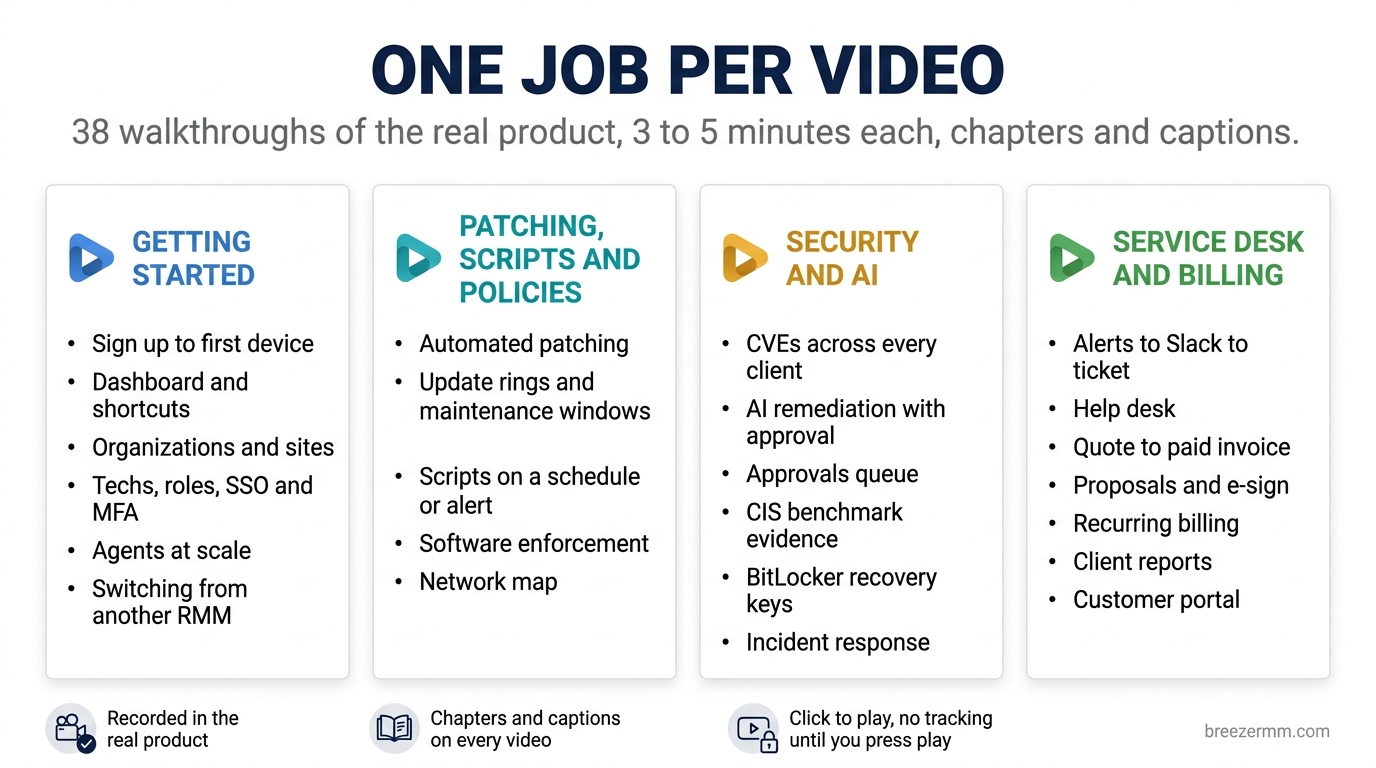
The most common request we get from an MSP evaluating Breeze is some version of “can I just watch it do the thing?” Not a sales deck. Not a feature page. The actual screen, doing the actual job, start to finish.
So we recorded it. There are now 38 videos on the Breeze RMM YouTube channel, and every one of them is also on this site at breezermm.com/videos with its chapters, a list of what the demo shows, and the questions it answers.
The rules we set for ourselves:
- One job per video. Set up patching. Route an alert to Slack and turn it into a ticket. Find a BitLocker recovery key. Not “an overview of security.”
- Three to five minutes. The longest one, proposals, runs five and a half because there is a lot in a proposal. Most are under four.
- The real product. Every frame is the shipping Breeze UI on a lab tenant. Nothing is mocked up.
- Chapters and captions on everything. Jump to the part you care about. Watch with the sound off.
Start here
If you have never opened Breeze, watch How to Set Up Breeze RMM: Sign Up to First Device in 5 Minutes. It is a real self-serve signup, forced MFA, a Linux agent enrolling live, and the first script run. Four and a half minutes.
Then pick the playlist that matches what you are evaluating.
Getting started
How the product is laid out and how an MSP’s clients fit into it.
- The dashboard, search and keyboard shortcuts
- The device details page, every tab explained
- Organizations, sites and device groups
- Add techs, set roles, require SSO and MFA
- Deploy agents at scale: silent install, Intune and GPO
- Switching from NinjaOne: import clients, custom fields and warranty dates
- How configuration policies resolve: default to override
Patching, scripts and policies
The daily fleet work.
- Set up automated patching for all your clients
- Maintenance windows and a pilot update ring
- Run PowerShell scripts on a schedule or on an alert
- Deploy software and enforce required apps
- Discover, map and monitor every device on a network
- Which network is each device really on: the topology explorer
Security and AI
This is the playlist most people ask about, and the one we were most careful with.
- Find and fix CVEs across every client machine
- Let AI remediate a CVE, with your approval
- Approve AI actions before they run: the approvals queue
- Set up AI agents that propose fixes and wait for approval
- Track, cap and bill back AI costs per client
- Run CIS benchmark scans and give clients the evidence
- Find a BitLocker recovery key in your RMM
- Track a client’s security score and show it improving
- Respond to a malware detection: IOC scan to client report
- Find risky users and sensitive files on client PCs
One of these is different from the rest. In I Asked My RMM’s AI Why a Server Was Slow, the AI turns are not scripted. A real model ran real commands against a live Linux container with a staged runaway process, found it, stopped before killing it, asked for approval, and wrote up what it changed. Where the model took longer than the narration we sped the picture up, but nothing is cut. We wanted at least one video where you can watch the assistant think, including the moment it hits a policy block and asks instead of guessing.
Alerts, service desk and billing
The half of the product that usually lives in a separate PSA.
- Route alerts to Slack and turn them into tickets
- Run a help desk in your RMM: email to timesheet
- Quote, contract, invoice, without leaving your RMM
- Build proposals clients read: cover page, pricing tables, agreements and e-sign
- Recurring billing for managed services contracts
- Product catalog, labor rates and service tiers
- Send clients a monthly executive report
- Spot trends across every client: analytics and capacity forecast
- Track warranties and plan hardware replacement
- The customer portal: approve quotes, pay invoices, open tickets
- Connect your RMM to other tools: webhooks and API keys
- Brand proposals and organize devices with custom fields and tags
- Who ran a script on a client’s server: the audit trail
How they were made, so you know what you are watching
The screen recordings are driven by scripts against a lab tenant, so each take is identical and we can re-record a video when the UI changes rather than letting it rot. The MSP, the clients and the devices are fictional seed data. The narration is a synthesized voice reading a script we wrote and edited by hand. We would rather tell you that than have you wonder halfway through.
Where a demo has a caveat, it is in the video description and on the video’s page on this site. If you spot something in a video that does not match the product you are running, open an issue and we will re-record it.
Where the videos show up on the site
You should not have to go hunting for them.
- Each feature page now plays the matching walkthrough at the top, above the written guide. Patch management plays the patching setup. Tickets plays the service desk. The AI assistant page plays the live troubleshooting session.
- PSA + RMM in one plays quote to paid invoice.
- The NinjaOne comparison plays the migration video.
- breezermm.com/videos is the full library, grouped the same way as the YouTube playlists.
The players are click-to-play. Nothing from YouTube loads, and no YouTube cookie is set, until you press play.
What we are filming next
In rough order:
- Remote desktop, quick support and remote tools. The feature techs use every hour. It needs a live Windows capture rig, which is why it is not in the first batch.
- Connect Claude to your RMM over MCP. The real how-to for the MCP server.
- Stop giving users local admin. Approval-based elevation from the PAM queue, with the end-user side on a real Windows box.
- Self-host Breeze with Docker Compose. Terminal footage plus the first-run tour.
- Device backup and a restore drill. Waiting for the last alpha badges to come off the restore wizard.
If there is a job you want to see before you commit to a trial, say so in Discord. Short, specific requests (“show me patch rollback”) go to the front of the queue.
Run Breeze on your own fleet
Start the Cloud Beta in minutes, or deploy for free with Docker Compose.