What Is an MCP Server? A Plain-Language Guide for MSPs
AI assistants are everywhere now. Every vendor has a chatbot, every product has a copilot, and every pitch deck promises that AI will transform your operations. But if you run an MSP, you have probably noticed the gap between what AI promises and what it actually does in your environment.
You can ask ChatGPT how to write a PowerShell script. You can ask Claude to help you draft a client email. But you cannot ask any of them to check whether the Contoso tenant has pending patches, restart the print spooler on a front-desk workstation, or pull the last 24 hours of alerts for a client site. They do not have access to your tools. They cannot touch your infrastructure.
The Model Context Protocol changes this. MCP is the standard that lets AI assistants use real tools in real environments — including your RMM platform.
What Is the Model Context Protocol?
MCP is an open standard created by Anthropic, the company behind Claude. It defines how AI clients communicate with external tools and data sources through a structured, predictable interface.
The easiest way to think about it: MCP is USB for AI.
Before USB, every peripheral had its own connector and driver. Printers needed parallel ports. Mice used PS/2. External drives had SCSI or FireWire. If you wanted to connect a new device to a computer, you needed to know what connector it required and find the right driver software.
MCP does for AI what USB did for hardware. It provides a universal connector between AI assistants and the services they need to use. Any AI client that speaks MCP can connect to any MCP server — no custom integration code, no vendor-specific plugins, no middleware.
The protocol defines three roles:
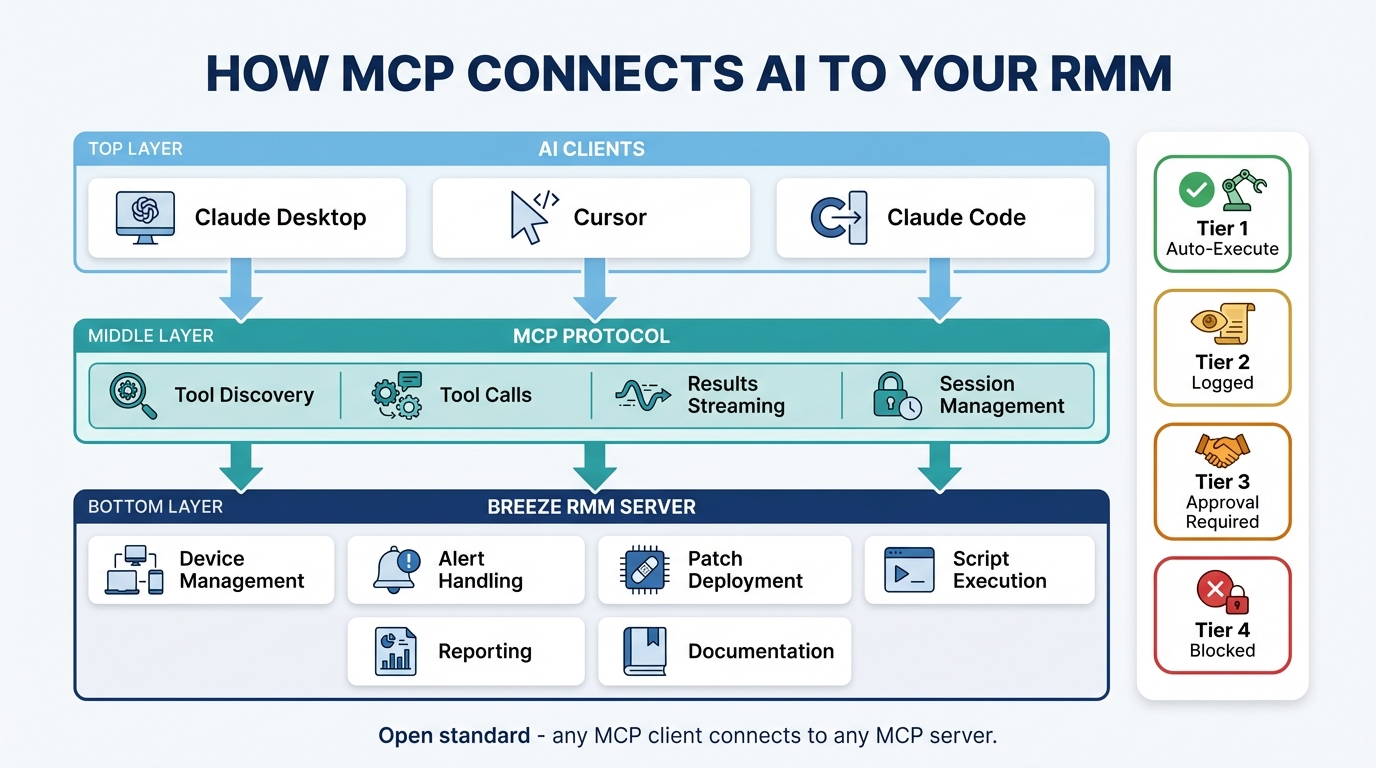
Host — The application you interact with. Claude Desktop, Claude Code, Cursor, Windsurf. This is where you type your questions and see the responses.
Client — The MCP client running inside the host. It manages the connection to MCP servers, discovers what tools are available, and handles the request/response cycle. You do not interact with the client directly — it is plumbing.
Server — The service that exposes tools and resources through the MCP protocol. This is the interesting part. The server is what gives the AI access to real capabilities — querying databases, managing devices, sending messages, deploying patches.
When you ask Claude Desktop a question that requires a tool, the client discovers which tools are available from connected servers, sends the request to the right server, and returns the result to the host. The AI never connects to your infrastructure directly. Everything flows through the server, which controls access and enforces policy.
What Is an MCP Server?
An MCP server is a service that exposes a set of tools and resources through the Model Context Protocol. It sits between the AI assistant and whatever system you want the AI to interact with.
The concept is straightforward. An MCP server declares: “Here are the tools I offer, here is what each tool does, here are the parameters each tool accepts, and here are the permissions required to use each one.” The AI client reads this declaration, understands what is available, and can invoke those tools when a user’s request calls for them.
Examples make this concrete:
- GitHub MCP server — Exposes tools to create repositories, open pull requests, review code, manage issues. Connect it to Claude Desktop and you can say “create an issue in our infra repo for the DNS timeout we discussed” and it happens.
- Slack MCP server — Exposes tools to send messages, read channels, search conversations. Ask the AI to “summarize what the NOC channel discussed overnight” and it reads the channel and gives you a digest.
- Database MCP servers — Expose query tools for PostgreSQL, MySQL, or SQLite. Ask natural-language questions about your data and get real answers pulled from real tables.
An MCP server for an RMM platform means AI assistants can manage devices, query fleet status, deploy patches, handle alerts, and run scripts — all through the protocol. The AI does not need to know how your RMM API works internally. It just needs to know what tools the MCP server exposes.
Why Should MSPs Care?
If you are running an MSP, MCP solves a practical problem: your AI tools and your IT management tools live in separate worlds. MCP connects them.
Workflow integration
With an MCP server connected, you can manage your fleet from Claude Desktop while writing client documentation. You can query device status from Cursor while coding an automation script. You can pull alert summaries from Claude Code while building a runbook. The AI assistant becomes a second screen into your RMM — one that understands natural language.
No UI lock-in
Traditional copilots and chatbots are locked to one vendor’s interface. If your RMM has a built-in chatbot, you can only use it inside that RMM’s web UI. MCP is different. Because it is a standard protocol, you use whatever AI client you prefer. If you switch from Claude Desktop to Cursor tomorrow, your MCP server still works.
Composability
This is where MCP gets genuinely powerful. You can connect multiple MCP servers to a single AI client. RMM server, ticketing server, monitoring server, documentation server — all in one conversation. Ask the AI to “check if any Contoso devices have critical alerts, and if so, create a ticket in ConnectWise” and it can chain calls across both servers in a single response.
You do not need to build that integration. The AI handles the orchestration because it has access to tools from multiple sources simultaneously.
It is an open standard
MCP is not a proprietary protocol owned by one vendor. Anthropic published the specification openly, and any vendor can implement it. That means adopting MCP does not create vendor lock-in. If you connect to a Breeze MCP server today and switch RMM platforms later, the new platform can expose its own MCP server with the same protocol. Your workflow patterns and muscle memory transfer.
How MCP Differs From Traditional APIs and Chatbots
MCP occupies a different space than the tools you are already familiar with. Here is how it compares:
| Traditional API | Chatbot / Copilot | MCP Server | |
|---|---|---|---|
| Who uses it | Developers | End users | AI assistants |
| Integration effort | Custom code per integration | Vendor-specific | Standard protocol |
| Tool discovery | Read docs, write code | Fixed menu | Dynamic — AI discovers available tools |
| Composability | Build it yourself | None | Multiple servers in one session |
| Governance | Your code handles it | Vendor decides | Server controls (Breeze enforces risk tiers) |
The traditional API path requires a developer to read documentation, write integration code, handle authentication, manage errors, and maintain the integration as both sides evolve. It is powerful but expensive to build and maintain.
Chatbots and copilots are easier to use but inflexible. They offer a fixed set of capabilities decided by the vendor, embedded in the vendor’s UI, with no way to compose them with other tools.
MCP servers sit in the middle. They require no custom integration code from the user. The AI client discovers tools dynamically and uses them based on context. And because the protocol is standard, you can mix and match servers from different vendors in a single session.
How Breeze Implements MCP
Breeze exposes 17 MCP tools through a Server-Sent Events (SSE) endpoint. These tools cover the core workflows MSPs deal with daily:
- Device management — Query device details, search the fleet, check status
- Alert handling — List alerts, filter by severity, acknowledge, resolve
- Patch deployment — Check patch compliance, view pending updates, deploy patches
- Script execution — Run scripts on target devices, retrieve output
- Reporting — Pull metrics, analyze trends, generate summaries
The same 4-tier risk engine that governs the web UI applies to every MCP tool call. Tier 1 (read-only queries) auto-executes with no user interaction. Tier 2 (low-risk writes like acknowledging alerts) auto-executes with audit logging. Tier 3 (operational actions like restarting services) requires explicit user confirmation in the AI client before executing. Tier 4 (destructive actions) is blocked entirely.
Access control
API key scopes control what an MCP client can do:
ai:read— Query devices, alerts, metrics. No changes.ai:write— Acknowledge alerts, update device notes, manage tags.ai:execute— Run scripts, deploy patches, restart services.
Tenant isolation means a key scoped to one client can only access that client’s devices. If you generate an API key for the Contoso tenant, it cannot see or touch devices in the Fabrikam tenant. This is enforced at the server level — the AI client never even sees tools for tenants outside the key’s scope.
Setup
Connecting Breeze to Claude Code takes one command:
claude mcp add breeze-rmm \
  --transport sse \
  --url https://your-api/api/v1/mcp/sse \
  --header "X-API-Key: brz_..."
For Claude Desktop, you add the same configuration to your claude_desktop_config.json. For Cursor or Windsurf, the process is similar — point the MCP client at the SSE URL with your API key.
Once connected, the AI client discovers all available tools automatically. No additional configuration required.
What You Can Actually Do With It
Theory is useful, but concrete scenarios are more convincing. Here is what MCP-powered RMM management looks like in practice.
Triage alerts at 2 AM
You get paged. You open Claude Desktop and type:
“Show me all critical alerts from the last hour.”
The AI calls manage_alerts with the appropriate filters — a Tier 1 operation that auto-executes instantly. You get a structured table: alert titles, affected devices, timestamps, severities. No clicking through dashboards, no filtering dropdown menus, no waiting for pages to load.
Check compliance across a tenant
A client asks for a patch status update before their quarterly review. You type:
“What’s the patch status across the Contoso tenant?”
The AI queries fleet state, aggregates compliance data, and summarizes the gaps: “42 of 48 devices are fully patched. 6 devices have pending critical updates — here’s the list.” You copy the summary into the client report. What used to take 15 minutes of clicking through device pages takes 30 seconds.
Fix a problem remotely
A user reports that printing is broken. You know the device. You type:
“Restart the print spooler on FRONT-DESK-PC.”
This is a Tier 3 action — the AI client shows you a tool confirmation dialog before executing. You review the action (restart service: Spooler, target: FRONT-DESK-PC), click approve, and the command runs. The AI confirms the service restarted successfully and reports the current status.
Investigate across systems
You have Breeze and a ticketing MCP server connected. You type:
“Check if any devices at the Downtown Office site are alerting, and summarize what’s happening.”
The AI queries Breeze for alerts filtered by site, pulls device details for affected machines, cross-references recent metrics, and gives you a narrative summary. If you want, you can follow up with “create a ticket for this” and it calls the ticketing server to file the issue — all in one conversation.
Governance and Safety
MCP does not mean the AI has free rein over your infrastructure. The protocol is a transport layer — it defines how tools are discovered and invoked. What happens when a tool is invoked is entirely up to the server.
Breeze enforces the same governance on MCP tool calls that it enforces on actions taken through the web UI:
- RBAC — Role-based access control determines which tools are available based on the API key’s permissions
- Risk tiers — Every tool is classified into one of four risk tiers, and the enforcement rules cannot be overridden by the AI
- Rate limits — Per-user and per-organization rate limits prevent runaway usage
- Audit logging — Every MCP tool call is logged with the same detail as web UI actions: who, what, when, which device, what parameters, what result
For production hardening, you can configure tool allowlists to restrict which MCP tools are available through a given API key. If you want a key that can only read data and acknowledge alerts — nothing else — you can set that up. The ai:execute scope is opt-in and can be restricted further with allowlists.
The audit log does not distinguish between “a human clicked a button” and “an AI called a tool through MCP.” Both are first-class actions with full traceability. If an auditor asks who restarted a service at 3 AM, the log shows the API key, the MCP tool call, the parameters, the device, and the result.
Getting Started
If you want to connect an AI assistant to your Breeze instance through MCP, here is where to start:
- MCP Server feature page — Overview of all 17 tools, risk tier classifications, and architecture details
- Configuring Breeze AI — Full setup guide covering API keys, budget configuration, scope management, and production hardening
- What Breeze AI can do for your help desk — Practical scenarios showing the AI capabilities in action
Compatible clients include Claude Desktop, Claude Code, Cursor, and Windsurf. Any client that supports the MCP protocol and SSE transport will work.
MCP is still early. The specification is evolving, the ecosystem of servers is growing, and the patterns for how MSPs use AI-connected tools are just starting to form. But the direction is clear: AI assistants that can only answer questions are being replaced by AI assistants that can take action. MCP is the protocol that makes the connection safe, standard, and composable.
If you manage endpoints for a living, it is worth understanding now.
Related