Patch Management Best Practices for MSPs
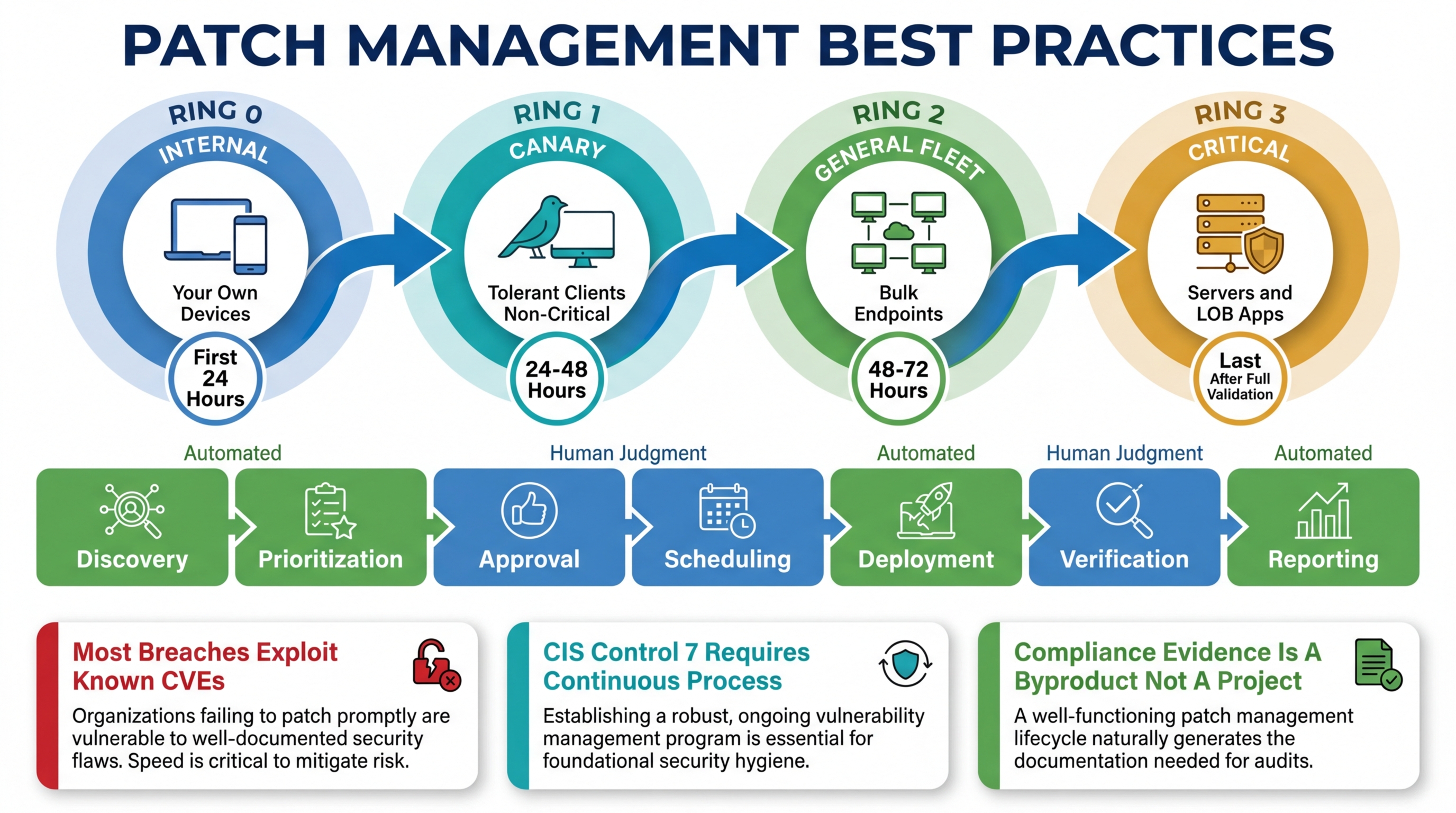
Patching is the highest-leverage security activity an MSP performs. It is also the one most likely to be done poorly, not because MSPs do not understand its importance, but because the operational reality of patching across diverse client environments makes “do it well” significantly harder than “do it at all.”
The gap between a mediocre patching practice and a strong one is not knowledge. Every MSP knows patches should be applied promptly. The gap is process: how you discover what needs patching, how you prioritize when you cannot patch everything at once, how you test without a dedicated QA environment, how you schedule around business operations, how you handle failures, and how you prove to clients and auditors that it all actually happened.
This post is the operational playbook. Not theory, but the specific practices that separate MSPs who patch effectively from MSPs who are perpetually behind and hoping nothing gets exploited before they catch up.
Why Patching Matters More Than MSPs Think
Most MSPs understand patching as a security hygiene task. Apply updates, close vulnerabilities, move on. The reality is that patching has become the primary battleground for most of the attacks that affect small and mid-size businesses.
The numbers are not ambiguous. The majority of successful breaches exploit known vulnerabilities, vulnerabilities with available patches that were not applied. Not zero-days. Not sophisticated nation-state attacks. Known vulnerabilities with published CVEs and available fixes that sat unpatched for weeks or months.
For MSPs specifically, the stakes are amplified by two factors.
First, a single unpatched vulnerability affects every client who has the vulnerable software. If you manage 20 clients and all of them run the same version of a VPN appliance with a known critical CVE, you have 20 potential breach surfaces, not one. The MSP’s patch management process is the single point of control for all of them.
Second, MSPs are increasingly targeted precisely because they manage multiple organizations. Compromising an MSP’s infrastructure gives the attacker access to every client the MSP manages. The RMM platform, the PSA, the remote access tools: these are the crown jewels for an attacker who wants to move laterally across dozens of organizations. Keeping those tools and every managed endpoint patched is not just good practice. It is existential risk management.
Beyond security, patching has compliance implications that directly affect revenue. CIS Control 7 (Continuous Vulnerability Management) requires a demonstrable process for identifying and remediating vulnerabilities. NIST CSF, HIPAA, SOC 2, and most state-level privacy regulations include patching requirements. If you sell compliance services (and the margin-conscious MSP should be selling compliance services), your patch management process is audit evidence. It needs to be documented, consistent, and verifiable.
The Challenges MSPs Face
Patch management in a single-organization IT environment is hard enough. Patch management across 10-50 client environments, each with different software stacks, business requirements, and tolerance for disruption, is a fundamentally different problem.
Diverse Client Environments
Client A runs a line-of-business application that breaks when .NET Framework updates past a specific version. Client B has a SCADA system that must not be patched without vendor certification. Client C has a development team that needs the latest everything. Client D has 15-year-old hardware that cannot run the latest OS patches without performance degradation.
Every one of these constraints is a special case that your patch management process needs to handle without manual intervention on every patch cycle. The moment your patching process requires a technician to remember that Client A’s accounting server needs .NET updates excluded, you have a process that depends on human memory. Human memory fails. When it fails with patching, the result is either a broken application or a missed patch. Neither is acceptable.
Testing Requirements Without Test Environments
Enterprise IT departments have staging environments that mirror production. They patch staging first, run validation tests, and promote to production after verification. MSPs do not have this luxury for every client. You cannot maintain a staging copy of each client’s environment; the cost and complexity are prohibitive.
But deploying patches without any testing is reckless. A bad Windows update that causes blue screens across a client’s fleet will cost more in emergency response and client relationship damage than any security breach you were trying to prevent. The challenge is finding a testing methodology that is practical at MSP scale.
Maintenance Windows
Patches require reboots. Reboots cause downtime. Downtime during business hours causes angry calls from clients. The solution is maintenance windows: scheduled periods when patches can be applied and devices can reboot without affecting business operations.
The challenge is that maintenance windows vary by client, by device role, and by criticality. The accounting server gets a different window than the marketing team’s workstations. The 24/7 call center gets a different window than the law firm that closes at 5 PM. The RMM platform needs to enforce these windows automatically, because a technician manually scheduling every patch deployment for every device is a process that does not scale.
Rollback
Not every patch installs successfully. Not every successfully installed patch works correctly. You need the ability to roll back a problematic patch, and you need to know it is problematic before the client calls to tell you their line-of-business application stopped working.
Rollback capability varies by operating system and patch type. Windows Feature Updates can be rolled back within a configurable window. Individual Windows quality updates are harder to roll back cleanly. Third-party application updates may not have rollback support at all. Your patch management process needs to account for these differences and have a documented plan for each scenario.
Best Practices: The Operational Playbook
1. Start With Inventory: You Cannot Patch What You Do Not Know About
This sounds obvious. It is not, in practice. Most MSPs have an incomplete picture of the software installed across their managed fleet. Shadow IT installs, browser plugins, portable applications, outdated software that was “temporarily” installed three years ago: all of it represents patch surface that your process needs to cover.
A comprehensive software inventory is the foundation of a patch management program. Not a point-in-time scan, but a continuously updated inventory that detects when new software is installed, when versions change, and when software is removed. The inventory should include version numbers, because “Client has Adobe Acrobat” is not useful information. “Client has Adobe Acrobat DC version 23.003.20215 with two known critical CVEs” is actionable information.
Breeze collects software inventory continuously through the agent and correlates it against NVD data for CVE identification. When a new CVE is published affecting software in your fleet, the exposure surfaces automatically rather than waiting for your next manual review. This is what CIS Control 7 actually requires: continuous vulnerability management, not periodic scanning.
The inventory also needs to cover the things that are not traditional software: firmware on network devices, BIOS/UEFI versions, driver versions. These are frequently overlooked patch surfaces with high-impact vulnerabilities. The Meltdown and Spectre vulnerabilities required firmware updates, not software patches. If your inventory does not include firmware, your patch management has a blind spot.
2. Prioritize by Risk, Not by Vendor Release Date
You will never be able to patch everything immediately. Accepting this is the first step toward a rational prioritization scheme. The question is not “how fast can we patch everything.” It is “which patches reduce the most risk if applied first?”
Risk-based prioritization considers three factors:
Vulnerability severity. CVSS scores are a starting point, but they are not sufficient on their own. A CVSS 9.8 in software that runs on two devices is lower priority than a CVSS 7.5 in software that runs on every device in the fleet. Context matters.
Exposure. Is the vulnerable software internet-facing? Is it running on a server with sensitive data? Is the device in a network segment with access to critical systems? A vulnerability on an isolated workstation with no sensitive data is lower priority than the same vulnerability on a domain controller.
Exploitability. Is there a known exploit in the wild? Has CISA added it to the Known Exploited Vulnerabilities catalog? An actively exploited vulnerability with a CVSS of 6.5 is higher priority than a theoretical vulnerability with a CVSS of 9.0 and no known exploit.
Breeze’s patch management system supports approval workflows that let you categorize patches by criticality and route them through different deployment paths. Critical security patches can be approved automatically and deployed within hours. Feature updates and non-security patches can go through a review process with a longer deployment timeline. The approval workflow is the mechanism that turns prioritization from a decision you make once into a policy that executes consistently.
3. Implement Test Rings
You do not need a staging environment for every client to implement meaningful patch testing. You need test rings: a structured rollout that deploys patches to a small group first, validates the result, and then expands to the broader fleet.
A practical test ring structure for MSPs:
Ring 0: Internal devices. Your own workstations and servers. Patch these first. You experience the problems before your clients do, and you can validate without affecting anyone else’s business.
Ring 1: Tolerant clients, non-critical devices. A subset of devices at clients who are low-risk and have agreed to receive patches early. These are your canaries. If a patch causes issues on Ring 1 devices, you catch it before Ring 2 and Ring 3.
Ring 2: General fleet. The bulk of your managed endpoints. Patches deploy here after Ring 0 and Ring 1 have validated them for a defined period (24-72 hours depending on the patch type).
Ring 3: Critical and sensitive devices. Servers, devices running line-of-business applications, healthcare systems, financial systems. These get patches last, after the broadest possible validation from Rings 0-2.
The key is that these rings are enforced by the platform, not by a spreadsheet or a technician’s memory. Breeze’s configuration policies support hierarchical policy assignment, which means you define the ring structure once, at the partner, organization, site, or device group level, and the platform enforces it on every patch cycle. A device in Ring 3 does not receive a patch until Ring 2 has had it for the defined validation period. No technician intervention required.
4. Enforce Maintenance Windows Automatically
Maintenance windows should be defined per client, per device role, and enforced automatically by the platform. The definition is simple: when can this device receive patches and reboot without affecting business operations?
The implementation requires granularity. The accounting team’s workstations might have a maintenance window of 8 PM - 6 AM on weekdays and all day on weekends. The file server might only have a window of 2 AM - 5 AM on Sunday mornings. The receptionist’s workstation at a medical clinic might have a window of 7 PM - 6 AM because the clinic closes at 6 PM and opens at 7 AM.
Breeze’s maintenance windows system supports this granularity and integrates directly with the patch management pipeline. Patches are scheduled, not deployed immediately. The scheduling respects the maintenance window for each device. If a patch deployment misses a maintenance window (the device was offline, the window was too short for the required reboot), the deployment is rescheduled for the next available window rather than queued for immediate deployment during business hours.
The common failure mode is that maintenance windows exist as a concept but are not enforced by the platform. The technician knows the window is “after hours” but manually triggers a deployment at 3 PM because the patch is critical and they will forget to come back tonight. That kind of process exception is how you end up rebooting a server during a client’s quarter-end close. Automated enforcement eliminates the exception.
5. Automate Everything That Does Not Require Judgment
The components of patch management that should be automated:
- Discovery: new patches are identified and classified automatically, not by a technician manually checking vendor release notes
- Approval for low-risk patches: security patches with a defined severity threshold can be auto-approved per policy, without a technician reviewing each one
- Scheduling: patches are scheduled according to the maintenance window and test ring policies, not manually scheduled per device
- Deployment: the actual installation happens within the scheduled window without technician intervention
- Verification: post-installation checks confirm the patch installed successfully and the device is functioning normally
- Reporting: compliance reports are generated automatically with timestamp evidence of when each patch was approved, deployed, and verified
The components that require human judgment:
- Exception handling: deciding whether a specific patch should be excluded for a specific client due to application compatibility
- Emergency patching: deciding to break the normal ring schedule for an actively exploited zero-day
- Rollback decisions: determining that a patch is causing problems and should be rolled back across the fleet
- Client communication: explaining to a client why their server needs to reboot during a specific window
Breeze’s automation engine handles the automated components through policy-driven workflows. The platform handles discovery, scheduling, deployment, and verification. The technician handles the exceptions, which is where their judgment actually adds value.
6. Report Like You Are Being Audited, Because You Will Be
Patch management reporting serves two audiences: clients who want to know their systems are being maintained, and auditors who want evidence that the maintenance happened consistently over time.
Client-facing reports should be simple: percentage of devices that are fully patched, list of outstanding patches and why they are pending, summary of patching activity over the reporting period. These reports build client confidence and justify the managed services fee.
Audit-facing evidence is more demanding. An assessor evaluating CIS Control 7 compliance wants to see: the date each vulnerability was identified, the date a patch was approved, the date the patch was deployed, verification that the patch installed successfully, and evidence that this process happened consistently across the entire fleet for the duration of the audit window. Missing timestamps, inconsistent evidence, or manual records that could have been fabricated all weaken the compliance position.
Breeze produces this evidence as a byproduct of the patching process. Every patch cycle generates timestamped records of discovery, approval, deployment, and verification. The reports and analytics module aggregates this data into both client-facing summaries and audit-ready evidence packages. You do not build the report. The report builds itself from the operational data that already exists.
7. Correlate Patches With Vulnerabilities
Patching and vulnerability management are the same discipline. A patch is the remediation for a vulnerability. If your patch management process and your vulnerability assessment process operate independently, with different tools, different schedules, different reports, you have a gap where vulnerabilities are identified but not remediated, or patches are deployed but not mapped to the vulnerabilities they address.
The integration point is the software inventory. When you know exactly what software and versions exist across your fleet, and you correlate that inventory against the National Vulnerability Database (NVD), you get a real-time view of your exposure. When a patch deploys successfully, the remediation is recorded against the specific CVEs it addresses. The result is a closed loop: vulnerability identified, patch deployed, vulnerability remediated, evidence recorded.
Breeze implements this correlation natively. The software inventory feeds into NVD correlation, which identifies CVEs affecting the fleet. The patch management system addresses those CVEs. The reporting layer connects the vulnerability to the remediation. This is what continuous vulnerability management actually looks like: not a quarterly scan that produces a PDF, but a pipeline that runs continuously and produces audit-ready evidence.
CIS Control 7: What the Framework Actually Requires
CIS Control 7 (Continuous Vulnerability Management) is worth examining specifically because it is the compliance control most directly tied to patch management, and most organizations underestimate what “continuous” means.
The control requires:
- A process for receiving vulnerability intelligence. Not “we check once a month,” but a process that identifies new vulnerabilities as they are published.
- A process for evaluating exposure. When a vulnerability is published, determine which devices in the fleet are affected.
- A process for remediating vulnerabilities. Deploy patches (or mitigations when patches are unavailable) according to a defined timeline based on severity.
- Evidence that the process is followed consistently. Timestamped records of identification, evaluation, and remediation for each vulnerability over the audit window.
Most MSPs can describe a process that meets these requirements. Fewer can produce the evidence that the process was followed consistently for 90 or 180 days. The evidence gap is where compliance programs fail.
The solution is automation. When the vulnerability identification, exposure evaluation, patch deployment, and evidence collection all happen automatically through the platform, the evidence is a byproduct of operations rather than a separate deliverable that someone has to build. Breeze’s architecture produces this evidence natively because the data pipeline (software inventory, NVD correlation, patch deployment, verification) is a single integrated system rather than multiple tools that need to be manually connected.
For a detailed map of how Breeze covers each CIS Control, see 13 of 18 CIS Controls, Automatically: Here Is the Map.
The Practical Starting Point
If your current patch management process is “we run Windows Update manually when we think about it,” the jump to the full playbook above is large. Here is the practical sequence for improving incrementally:
Week 1: Get a complete software inventory across all managed devices. You cannot improve what you cannot see.
Week 2: Define maintenance windows for every client. Start with two buckets: business hours and after hours. Refine later.
Week 3: Enable automated deployment for security patches within the maintenance windows. Start with workstations only; servers come later once you are confident in the process.
Week 4: Implement Ring 0 (your own devices) and Ring 2 (general fleet). Ring 0 gets patches 48 hours before Ring 2.
Month 2: Add Ring 1 (early adopter clients) and Ring 3 (critical servers and sensitive devices). Enable automated compliance reporting.
Month 3: Implement CVE correlation against your software inventory. Begin producing vulnerability management evidence for compliance-conscious clients.
Each step makes the next step easier because you are building on automated foundations rather than manual processes. The platform handles the execution. Your job is defining the policies, handling the exceptions, and reviewing the results.
Breeze’s patch management is designed around these practices. See the full capabilities at /features/patch-management, or explore the broader platform at /features. If compliance is a priority, the configuration policy system at /features/configuration-policies is where the test ring and maintenance window policies are defined and enforced across the fleet.