MCP SSE Transport: How Real-Time AI Tool Connections Work
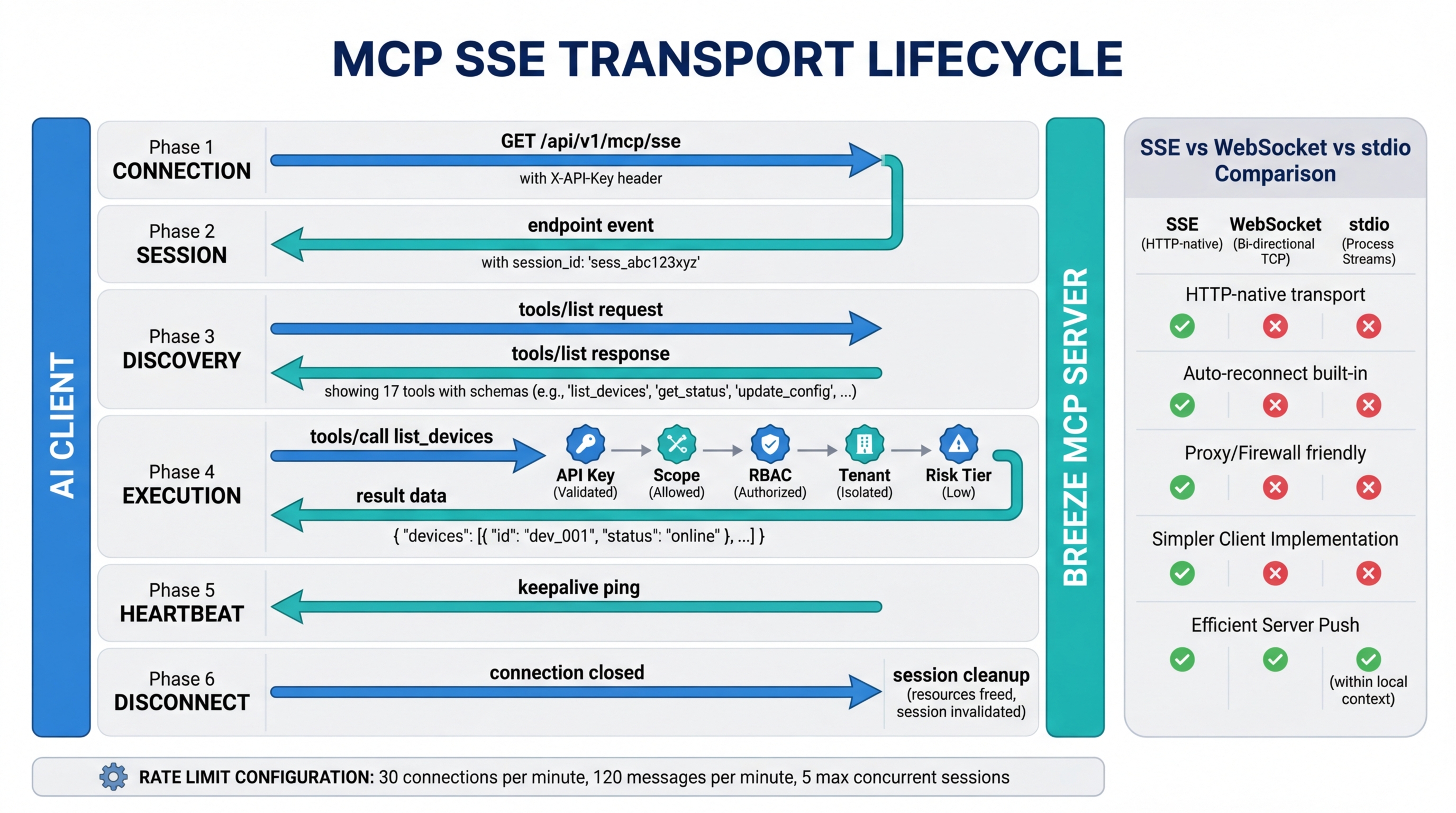
The Model Context Protocol defines two transport mechanisms for client-server communication: stdio and SSE. If your MCP server is a local process — a database adapter, a filesystem tool, a code analysis engine — stdio is the natural choice. But if you are connecting an AI client to a remote service over the network — an RMM platform, a SaaS API, a cloud infrastructure tool — SSE is the transport you will use.
This distinction matters because the transport layer determines how connections are established, how sessions are managed, and what failure modes you need to handle. Most MCP documentation focuses on tool schemas and capability negotiation. This post focuses on the wire protocol: how SSE transport actually works, why it was chosen over alternatives, and how Breeze implements it with authentication, rate limiting, and governance layered on top.
MCP Transport Options: stdio vs SSE
MCP supports two transports. Each is designed for a different deployment model.
stdio (Standard I/O)
stdio transport is used when the MCP server runs as a local child process on the same machine as the client. The client spawns the server process and communicates through stdin/stdout pipes. There is no network involved.
This is the common pattern for development tools. A local SQLite MCP server reads and queries a database file on disk. A filesystem MCP server provides file operations within a project directory. A code analysis server runs language-specific tooling against a local codebase. The client starts the process, sends JSON-RPC messages to stdin, and reads responses from stdout.
stdio transport has near-zero latency and no authentication overhead — the operating system’s process isolation is the security boundary. It is simple, fast, and appropriate for tools that operate on local resources.
SSE (Server-Sent Events)
SSE transport is used when the MCP server is a remote service accessible over HTTPS. The client opens a persistent HTTP connection to the server for receiving events (server-to-client), and sends requests via standard HTTP POST (client-to-server).
This is the pattern for any hosted service that exposes MCP capabilities. Breeze RMM, Slack, GitHub, cloud infrastructure providers — any service where the tool server runs on remote infrastructure and clients connect over the network. The server maintains state, enforces authentication, and controls access to the tools it exposes.
SSE transport introduces network latency, requires authentication, and needs connection management. It also enables capabilities that stdio cannot provide: multi-tenant access control, centralized audit logging, rate limiting, and the ability for multiple clients to connect to the same server simultaneously.
How SSE Transport Works in MCP
The SSE connection lifecycle has six phases. Understanding each one matters for debugging connection issues and building resilient integrations.
1. Connection
The client sends an HTTP GET request to the server’s SSE endpoint. For Breeze, this is /api/v1/mcp/sse. The server does not close the connection after responding — it holds it open as a persistent event stream. This is standard SSE behavior: the HTTP response has Content-Type: text/event-stream and the server writes events to the response body as they occur.
GET /api/v1/mcp/sse HTTP/1.1
Host: your-breeze-instance.example.com
X-API-Key: brz_your_api_key_here
Accept: text/event-stream
2. Session Establishment
Once the connection is open, the server sends an endpoint event. This event contains the URL that the client should use for sending messages (client-to-server communication). The SSE connection itself is one-directional — server to client only. The client needs a separate channel for sending requests, and the endpoint event tells it where that channel is.
event: endpoint
data: /api/v1/mcp/message?session_id=abc123
The session ID ties the SSE event stream to the message endpoint. Every request the client sends to the message URL is correlated with its SSE connection, so the server knows which event stream to push the response to.
3. Tool Discovery
With the session established, the client sends a tools/list JSON-RPC request to the message endpoint via HTTP POST. The server responds with the list of available tools, including their names, descriptions, and input schemas.
{
  "jsonrpc": "2.0",
  "id": 1,
  "method": "tools/list"
}
The response arrives as an event on the SSE stream, not as an HTTP response to the POST. This is a key detail — the POST returns a 202 Accepted (or similar acknowledgment), and the actual result comes back over the persistent SSE connection. This decouples request submission from response delivery, which allows the server to process requests asynchronously.
4. Tool Execution
The client sends a tools/call request to the message endpoint with the tool name and arguments. The server validates the request, executes the tool, and pushes the result back over the SSE stream.
{
  "jsonrpc": "2.0",
  "id": 2,
  "method": "tools/call",
  "params": {
    "name": "list_devices",
    "arguments": {
      "status": "online",
      "limit": 50
    }
  }
}
The result arrives as a message event on the SSE connection, matched to the original request by its JSON-RPC id field.
5. Heartbeat
The server sends periodic keepalive events to prevent the connection from being closed by intermediate infrastructure — proxies, load balancers, firewalls that drop idle connections. These are typically comment lines in the SSE stream (lines starting with :) or named ping events.
: keepaliveWithout heartbeats, a connection that has no tool calls in progress may appear idle and get terminated by a proxy with a 60-second timeout. The keepalive interval is typically shorter than the shortest timeout in the network path.
6. Disconnection
The client closes the SSE connection by dropping the HTTP request. The server detects the closed connection and cleans up the session state — releasing any resources held for that session, removing it from the active session registry, and logging the disconnection.
Why SSE Over WebSockets
The choice of SSE over WebSockets is deliberate and worth understanding, because it affects deployment and operations.
SSE is HTTP-native. An SSE connection is a standard HTTP response that happens to stay open. It does not require a protocol upgrade, a special handshake, or any behavior that deviates from normal HTTP. This means SSE connections pass through standard proxies, load balancers, CDNs, and enterprise firewalls without special configuration. WebSocket connections require an HTTP Upgrade handshake that many enterprise network appliances block, log differently, or fail to proxy correctly.
The communication pattern matches the use case. MCP tool interactions follow a request-response pattern: the client sends a tool call, the server returns a result. This is RPC, not bidirectional streaming. SSE provides server-to-client push (for responses and notifications) while standard HTTP POST handles client-to-server requests. You do not need full-duplex communication for tool call/response patterns.
Automatic reconnection is built in. The browser’s EventSource API and most SSE client libraries implement automatic reconnection with configurable retry intervals. When a connection drops, the client reconnects without application-level intervention. WebSockets require the application to detect disconnection and implement its own reconnection logic.
Simpler server implementation. An SSE server is an HTTP endpoint that writes to a response stream. A WebSocket server needs to manage connection upgrades, frame parsing, ping/pong, and bidirectional message routing. For a protocol where the server-to-client and client-to-server paths have different characteristics (event stream vs. individual HTTP requests), SSE is a more natural fit.
The tradeoff is that SSE does not support binary data natively and has a limit on concurrent connections per domain in some browsers. Neither of these matters for MCP’s use case — tool calls and responses are JSON, and MCP clients are typically desktop applications or server-side processes, not browser tabs.
How Breeze Implements MCP SSE
Breeze’s MCP server implements the SSE transport with additional layers for authentication, governance, and operational safety.
Endpoint: POST /api/v1/mcp/sse for the initial SSE connection. The message endpoint URL is provided dynamically in the endpoint event after connection.
Authentication: Every SSE connection requires an API key passed via the X-API-Key header. The key determines which tenant the session belongs to, what tools are available, and what scopes are authorized.
Session management: Each SSE connection creates a session bound to the API key that opened it. Sessions are tracked server-side for rate limiting, audit logging, and concurrent connection enforcement.
Rate Limiting
Breeze enforces three rate limits on MCP connections, all configurable via environment variables:
| Variable | Default | Purpose |
|---|---|---|
MCP_SSE_RATE_LIMIT_PER_MINUTE | 30 | SSE connection attempts per API key per minute |
MCP_MESSAGE_RATE_LIMIT_PER_MINUTE | 120 | Messages sent to the message endpoint per API key per minute |
MCP_MAX_SSE_SESSIONS_PER_KEY | 5 | Maximum concurrent SSE sessions per API key |
The connection rate limit prevents runaway reconnection loops from consuming server resources. The message rate limit prevents a single client from monopolizing the server’s tool execution capacity. The session limit prevents a single API key from exhausting the server’s connection pool.
If you are hitting rate limits during normal operation, check whether your client is reconnecting more frequently than expected (a misconfigured proxy timeout is the usual cause) or whether your tool call volume genuinely requires a higher limit.
Validation Pipeline
Every tool call that arrives over the SSE transport passes through a multi-stage validation pipeline before execution:
- API key validation — Is the key valid and not revoked?
- Scope check — Does the key have the required scope for this tool?
- RBAC check — Does the user or service account behind the key have permission for this action?
- Tenant isolation — Is the request scoped to the correct tenant’s data?
- Risk tier evaluation — What is the risk level of this tool call, and does it require additional approval?
A tool call that fails any stage is denied, and the denial is logged with the reason. The client receives an error response on the SSE stream with a structured error code.
Audit Logging
All tool calls, results, and denials are logged regardless of transport. The audit record includes the tool name, arguments (with sensitive values redacted), the API key that made the request, the session ID, the timestamp, and the result or denial reason. This audit trail is queryable through the Risk Engine and is retained according to your configured retention policy.
Connection Resilience
SSE connections will drop. Networks are unreliable, servers restart for deployments, and intermediate infrastructure has timeout configurations that do not always match your needs. The question is not whether connections will drop, but how your setup handles it.
Automatic reconnection: Claude Desktop, Cursor, and most MCP client libraries implement automatic reconnection with exponential backoff. When the SSE connection drops, the client waits a short interval and reconnects. The server creates a new session, and the client re-issues tools/list to rediscover available tools.
In-flight tool calls: If a tool call was in progress when the connection dropped, the result may be lost. The client is responsible for detecting this (the JSON-RPC id never received a response) and retrying the call on the new connection. Breeze’s tool execution is idempotent where possible — retrying a list_devices call is safe. Retrying a mutating operation like restart_service may require the client to check whether the action already completed.
Session state: There is no persistent session state that carries across reconnections. Each new SSE connection is a fresh session. The client rediscovers tools, re-establishes its understanding of what is available, and proceeds. This is by design — stateless reconnection is simpler and more reliable than trying to resume a previous session.
Debugging MCP Connections
When an MCP connection is not working, these are the diagnostic steps that resolve the issue in the majority of cases.
Test basic connectivity. Open a terminal and run:
curl -N -H "X-API-Key: brz_your_key" https://your-api/api/v1/mcp/sseThe -N flag disables buffering. You should see the connection stay open and receive an endpoint event within a few seconds. If the connection closes immediately, check the API key and the server URL.
Check API key scopes. If the SSE connection opens but tools/list returns an empty or unexpected set of tools, the API key may not have the required scopes. Verify the key’s scope configuration in the Breeze admin panel.
Check rate limit configuration. If connections are being rejected with 429 status codes, check the MCP_SSE_RATE_LIMIT_PER_MINUTE and MCP_MAX_SSE_SESSIONS_PER_KEY environment variables. A client in a reconnection loop can exhaust the connection rate limit quickly.
Monitor the Risk Engine audit log. If tool calls are being sent but returning errors, check the audit log for denied tool calls. The denial reason will indicate whether the issue is scope, RBAC, tenant isolation, or risk tier.
Reverse proxy configuration. SSE connections behind Nginx, Caddy, or other reverse proxies require specific configuration to prevent the proxy from buffering or timing out the long-lived connection. For Nginx:
location /api/v1/mcp/ {
    proxy_pass http://backend;
    proxy_buffering off;
    proxy_cache off;
    proxy_read_timeout 86400;
    proxy_set_header Connection '';
    chunked_transfer_encoding off;
}
The critical settings are proxy_buffering off (so events are forwarded immediately rather than batched) and proxy_read_timeout 86400 (so the proxy does not close the connection after its default timeout, which is typically 60 seconds).
What This Means for MCP Server Setup
If you are standing up a Breeze instance and connecting AI clients to it, the SSE transport is the integration surface. The setup involves three pieces: configuring the Breeze MCP server endpoint, generating an API key with appropriate scopes, and pointing your MCP client (Claude Desktop, Cursor, or a custom integration) at the SSE URL with the API key.
The transport itself is transparent once configured. Your AI client sends tool calls, Breeze validates and executes them, and results flow back over the persistent connection. The SSE layer handles connection management, keepalives, and reconnection. The validation pipeline handles security and governance. You work with tools, not with transport.
For implementation details on what tools Breeze exposes and how to configure them, see the MCP Server feature page. For a walkthrough of setting up AI capabilities in a self-hosted Breeze instance, see Configuring Breeze AI: The Self-Hoster’s Guide.