Switching from ConnectWise to Breeze: What to Expect
If you are reading this, you are probably frustrated with ConnectWise pricing, complexity, or both. You are not alone. ConnectWise Automate and ConnectWise RMM are among the most widely deployed platforms in the MSP space, and they are also among the most common sources of frustration when MSPs start doing the math on what they actually pay versus what they actually use.
This is not a hit piece on ConnectWise. They built a massive ecosystem that serves tens of thousands of MSPs. The PSA integration is genuinely deep. The marketplace is extensive. The automation capabilities in Automate are powerful if you have the engineering resources to configure them properly. ConnectWise earned its market position.
But market position does not mean it is the right fit for every MSP, and the cost of staying on a platform that does not fit is real — measured in monthly invoices, in hours spent fighting complexity, and in features you pay for but never deploy. If you have been evaluating alternatives and Breeze is on your list, this guide covers what the switch actually looks like: what you keep, what changes, what you gain, and how to do it without disrupting your clients.
Who This Guide Is For
Not every ConnectWise user should switch. If you are a large MSP with 5,000+ endpoints, deep ConnectWise Manage integration across your entire billing and ticketing workflow, and a dedicated engineer who maintains your Automate instance — ConnectWise may genuinely be the right tool for your operation. The ecosystem advantages are real at that scale.
This guide is for a different profile:
MSPs paying for features they do not use. ConnectWise’s pricing model layers per-device fees, per-technician licenses, and add-on modules. If you are managing 200-1,000 endpoints and paying for the full Automate + Manage + ScreenConnect stack, you are likely spending $1,800-5,400 per month on tooling. Many MSPs at that scale use 30-40% of the available feature set. You are paying enterprise prices for a fraction of enterprise capabilities.
MSPs tired of add-on fees. Need patch management? Add-on. Advanced monitoring? Add-on. Compliance reporting? Add-on or third-party integration. The base platform price is the starting point, not the final number. Every feature expansion triggers a pricing conversation, and the per-device model means every cost scales linearly with the thing you are trying to grow.
MSPs who want control over their tooling. ConnectWise is a proprietary, closed-source platform. You cannot audit the agent code running on your clients’ devices. You cannot modify the platform to fit your workflow. You cannot self-host to meet compliance requirements that prohibit third-party cloud processing of client data. You are a tenant in ConnectWise’s ecosystem, subject to their upgrade timeline, their pricing decisions, and their product roadmap.
MSPs who have been burned by ConnectWise Automate’s complexity. Automate is powerful, but the learning curve is genuinely steep. Deployments that were supposed to take weeks take months. Automation scripts that should be straightforward require deep platform-specific knowledge. If your team spends more time maintaining the RMM than using it to manage endpoints, the tool is working against you.
If any of those descriptions fit, keep reading.
What You Keep
Switching RMM platforms feels risky because your current tool — whatever its flaws — is known. You have built workflows around it. Your technicians know where the buttons are. The fear is that switching means starting from zero.
It does not. The core capabilities you rely on daily exist in Breeze, and in most cases they work with less configuration overhead.
Device monitoring and inventory. Continuous data collection across Windows, macOS, and Linux. CPU, memory, disk, network, installed software, running services, event logs. Breeze collects this through its agent and stores it in PostgreSQL with structured indexing — queryable by both human technicians and AI agents. You are not losing visibility. You are gaining a data layer that is designed to be acted on programmatically, not just displayed in a dashboard.
Patch management. OS and third-party patching with approval workflows, maintenance windows, and compliance reporting. Breeze handles this natively — no add-on, no separate module fee. The patch management system is integrated with the AI brain, which means patch compliance checks, deployment scheduling, and failure remediation can be automated at the level your risk tolerance allows.
Scripting and automation. If you have built PowerShell, Bash, or Python scripts for ConnectWise Automate, those scripts are portable. They run on endpoints, not on the RMM platform. Breeze’s script execution engine runs the same scripts with the same parameters. You will need to recreate the triggers and schedules within Breeze, but the actual automation logic transfers directly.
Remote access. Built-in remote desktop and terminal access without a separate ScreenConnect license. Breeze includes remote access as a core module — not an add-on, not a separate product with its own pricing tier.
Alerting and notifications. Threshold-based alerts with configurable notification channels. The monitoring data feeds into the same kind of alert rules you are used to building, with the addition that Breeze’s AI brain can evaluate alerts contextually before escalating to a human.
Multi-tenancy. Clean client separation with role-based access. Each client’s data is isolated. You can scope technician access to specific clients. The multi-tenant architecture is purpose-built for MSPs, not bolted onto an enterprise IT tool.
The operational core of what you do every day — monitor, patch, script, connect, alert — transfers directly. You are not losing capabilities. You are changing the platform that delivers them.
What Is Different
Honesty matters here. Breeze is not ConnectWise with a different logo. There are genuine differences, and understanding them before you switch prevents surprises during the transition.
Self-hosted vs. cloud-only (for now). Breeze is currently a self-hosted platform. You deploy it on your own infrastructure using Docker. A managed cloud option is coming, but today, self-hosting is the deployment model. For many MSPs, this is an advantage — you control the data, the infrastructure, and the compliance posture. For MSPs who want zero infrastructure responsibility, this is a factor to weigh. The deployment itself takes minutes, not months, but you are responsible for the underlying server, backups, and updates.
Community support vs. enterprise support tiers. ConnectWise offers paid support tiers, ConnectWise University training, and a large partner community built over a decade. Breeze has an active open-source community, public GitHub, Discord, and transparent roadmap, but it does not have a 1-800 support number with SLA-backed response times. If your operation depends on being able to call vendor support at 2 AM, that is a meaningful difference. If your team is technically self-sufficient and prefers community-driven support with full source code access for debugging, the Breeze model may actually be more effective.
Newer platform vs. established ecosystem. ConnectWise has been in the market for over a decade. Their integration ecosystem is vast — hundreds of third-party tools connect natively. Breeze is newer. The integration surface is growing but is not as broad today. If your workflow depends heavily on specific ConnectWise Marketplace integrations, verify that Breeze supports them or that alternatives exist before committing.
No PSA built in. ConnectWise Manage is one of the most deeply integrated PSA platforms in the MSP space, and the Automate-to-Manage pipeline is a core workflow for many MSPs. Breeze does not include a PSA. If your ticketing, billing, and client management are tightly coupled to ConnectWise Manage, migrating away from Automate means evaluating your PSA integration as well. Some MSPs use this as an opportunity to move to a standalone PSA; others find it is a reason to stay in the ConnectWise ecosystem.
AI-native architecture. This is not just “different” — it is fundamentally different in approach. ConnectWise is adding AI features incrementally to an existing platform. Breeze was built with AI as a core architectural layer. The 4-tier risk engine classifies every AI action before execution: autonomous for low-risk operations, human-in-the-loop for high-risk ones. This is not a chatbot bolted onto a dashboard. It is governed autonomy baked into the platform’s decision-making layer. Whether that matters to you depends on where you are in the AI adoption curve, but it is the kind of architectural difference that compounds over time.
The Migration Path
The single most important principle: do not rip and replace. You can run Breeze and ConnectWise simultaneously on the same endpoints. The agents coexist. This means you can migrate incrementally, validate at each step, and never have a moment where your monitoring goes dark.
Here is the path that works:
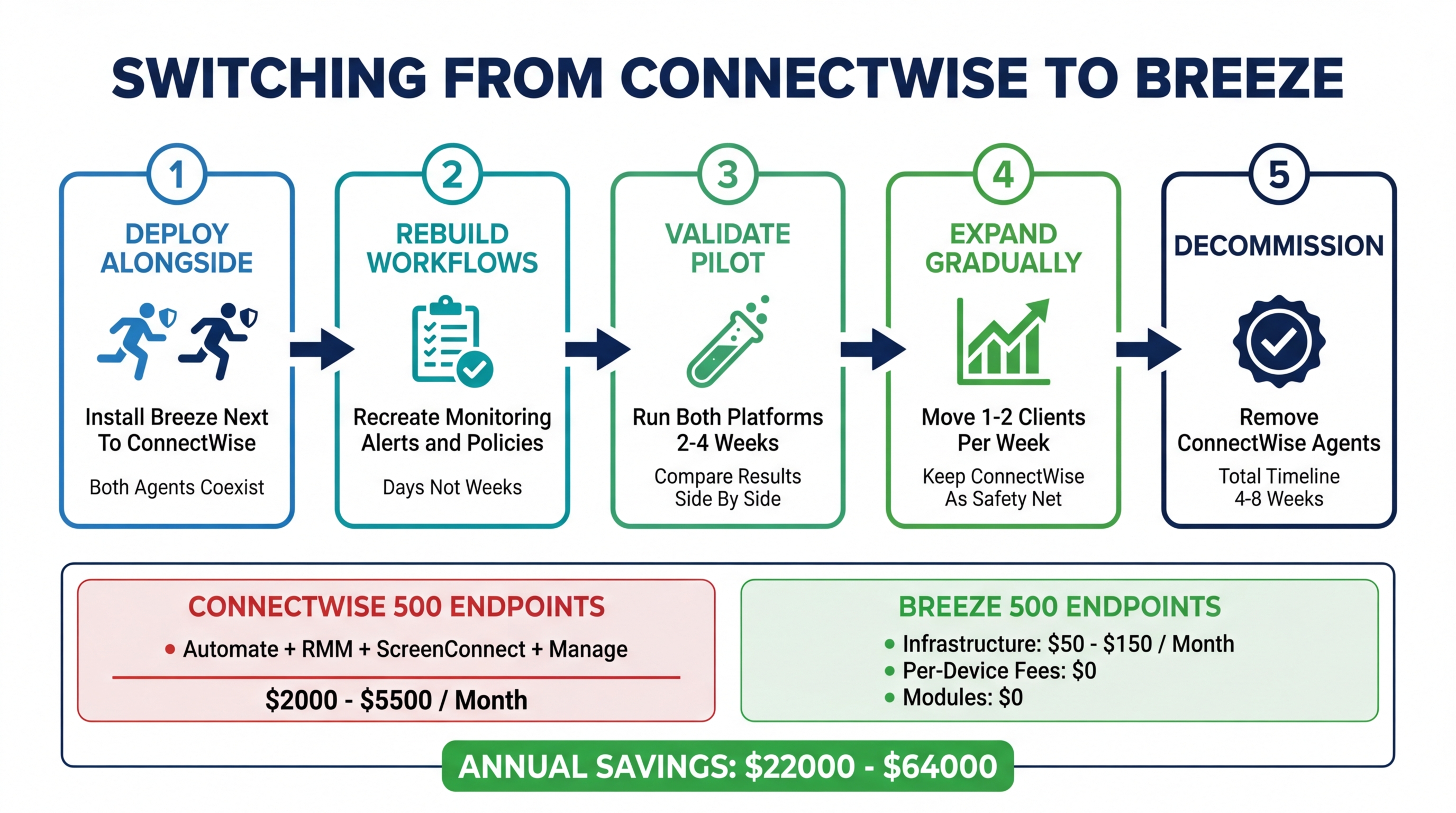
Step 1: Deploy Breeze Alongside ConnectWise
Stand up a Breeze instance on your infrastructure. Docker deployment takes minutes. Install the Breeze agent on a small test group of endpoints — ideally your own internal devices first, then a low-risk client with a few dozen endpoints. Both agents run simultaneously. Both platforms monitor the same devices. Nothing changes for your clients or your ConnectWise workflow.
Step 2: Rebuild Core Workflows in Breeze
With both platforms running in parallel, recreate your essential workflows in Breeze: monitoring thresholds, alert rules, patching policies, and your most-used scripts. This is not a one-to-one configuration export — you are rebuilding, not migrating configuration files. The good news is that Breeze’s configuration is simpler than ConnectWise Automate’s, so what took weeks to set up in Automate often takes days in Breeze.
Step 3: Validate With a Pilot Group
Run the pilot group on both platforms for two to four weeks. Compare alert accuracy, patch compliance rates, and remote access reliability. Let your technicians use both platforms and note where Breeze handles something better, where it handles something differently, and where there are gaps. This is your discovery phase — find the issues now, on a small group, not later across your entire fleet.
Step 4: Expand Gradually
Once the pilot group validates, expand to additional clients. Move one or two clients per week. Keep ConnectWise active as a safety net on migrated clients for at least two weeks after each migration. This parallel running costs you nothing extra on the Breeze side (no per-device fees) and gives you a rollback path if anything unexpected surfaces.
Step 5: Decommission ConnectWise
Once all clients are running on Breeze and you have confirmed full operational coverage, remove the ConnectWise agents and cancel the subscription. For most MSPs managing 200-500 endpoints, this entire process takes four to eight weeks. There is no hard cutover, no weekend migration, and no moment where you are flying blind.
What You Gain
Beyond feature parity with what you already have, the switch to Breeze adds capabilities that ConnectWise either does not offer or charges significantly more to access.
No per-device fees. Breeze is open source under AGPL-3.0. Self-hosted is free. Not “free tier with limitations” — the full platform with all 44 modules. Your RMM cost becomes your infrastructure cost: typically $50-150/month for a server that handles 500-1,000+ endpoints. Compare that to the per-device model where every endpoint you onboard increases your tool spend.
44 modules included from day one. Monitoring, patching, scripting, remote access, SNMP, compliance automation, AI governance, configuration policies — all included. No add-on pricing. No “contact sales for advanced features.” The platform you deploy is the full platform.
AI-native automation with governed autonomy. The AI brain is not a feature bolted onto the side. It is integrated into the platform’s decision layer with a 4-tier risk classification: informational actions run automatically, low-risk actions execute with logging, moderate-risk actions request approval, and high-risk actions require explicit human authorization. This means routine tasks — clearing temp files, restarting a hung service, applying an approved patch — can be handled without human intervention, while anything that could affect production gets a human checkpoint. The result is fewer tickets, faster resolution, and a safety model that lets you trust the automation.
Full source code access. Every line of code that runs on your infrastructure and on your clients’ devices is auditable. No black-box agents. No undisclosed telemetry. For MSPs serving compliance-sensitive industries — healthcare, financial services, government — this is not a philosophical preference. It is a practical requirement that eliminates an entire category of audit questions.
CIS Controls mapped and automated. Breeze maps 13 of the 18 CIS Controls automatically through its built-in data collection and policy engine. Compliance is not a separate product or integration — it is a byproduct of the platform doing its job. If you sell compliance services (and your margins say you should), this turns compliance reporting from a manual evidence-gathering exercise into an automated output.
No vendor lock-in. Your data lives in your PostgreSQL database, on your infrastructure, in a schema you control. If you ever need to leave Breeze, your data leaves with you. The codebase is open source — it cannot be acquired, sunset, or repriced behind a new licensing model. The worst-case scenario with open-source software is that development slows; the worst-case scenario with proprietary software is that the vendor makes decisions that are good for their business and bad for yours.
The Cost Math
The numbers are straightforward enough that you can run them on your own operation.
ConnectWise cost for a typical small-to-mid MSP (200-500 endpoints):
- ConnectWise Automate: $1.50-3.00/device/month
- ConnectWise RMM (if used instead of or alongside Automate): $2.00-4.00/device/month
- ScreenConnect: $1.00-2.00/device/month (or per-technician pricing)
- ConnectWise Manage: $35-59/user/month
- Add-ons, integrations, and overages: variable
For an MSP with 500 endpoints and 5 technicians, the fully loaded ConnectWise stack typically runs $2,000-5,500/month, or $24,000-66,000/year.
Breeze cost for the same operation:
- Self-hosted infrastructure: $50-150/month for a server capable of handling 500+ endpoints
- Per-device fees: $0
- Module add-ons: $0
- Total: $600-1,800/year
The difference: $22,000-64,000/year back into your business. That is a technician salary. That is a marketing budget. That is the margin that makes the difference between a business that is surviving and one that is growing.
The savings are not hypothetical. They are the direct, calculable result of removing per-device fees and add-on pricing from your cost structure.
Frequently Asked Questions
Can I really run both agents on the same endpoints? Yes. The Breeze agent and ConnectWise agent run as independent system services. They do not conflict. This is by design — we expect MSPs to run in parallel during migration and we test for coexistence.
How long does the full migration take? For most MSPs with 200-500 endpoints, four to eight weeks from initial deployment to full migration. The timeline depends on how many custom workflows you need to rebuild and how cautious you want to be with the rollout. There is no pressure to move fast — Breeze has no per-device fees, so running both platforms in parallel costs you nothing on the Breeze side.
What about my ConnectWise Automate scripts? Scripts that run on endpoints (PowerShell, Bash, Python) are portable. Scripts that use ConnectWise Automate’s internal scripting engine or API calls specific to the ConnectWise platform will need to be adapted. The execution logic is usually the same; the trigger and scheduling mechanism changes.
Do I need Linux experience to self-host? Basic familiarity helps, but the Docker deployment is designed to be approachable. If you can SSH into a server and run a few commands, you can deploy Breeze. The documentation walks through the full process, and the community Discord is active with people who have done the same deployment.
What if ConnectWise Manage is critical to my workflow? This is the most common reason MSPs stay in the ConnectWise ecosystem even when the RMM itself is painful. If your billing, ticketing, and client management are deeply integrated with Manage, switching away from Automate means rethinking the PSA integration. Some MSPs switch to standalone PSA tools (HaloPSA, Syncro’s PSA, or others) alongside Breeze. Others decide the Manage integration is worth the ConnectWise premium. There is no wrong answer — it depends on how coupled your operations are to Manage specifically.
Is Breeze production-ready? Yes. Breeze is running in production MSP environments today, managing real endpoints for real clients. It is open source, actively developed, and backed by a growing community. That said, it is a newer platform than ConnectWise. If you need a platform with a 15-year track record and the stability that comes from market incumbency, that is a legitimate consideration. We would rather you evaluate honestly than switch and be disappointed.
Making the Decision
Switching RMM platforms is not a decision to make lightly. Your RMM is the operational backbone of your business, and the switching cost — even with a gradual migration — is real in terms of time and attention.
But staying on the wrong platform has a cost too. It shows up in every invoice, in every hour spent fighting configuration complexity, in every feature you pay for but never use, and in every client engagement where you cannot offer compliance services because your tooling does not support them natively.
The question is not whether switching is hard. It is whether the ongoing cost of staying is higher than the one-time cost of moving.
If you are ready to evaluate, the next step is straightforward: deploy Breeze on a test server, install the agent on your own devices, and see how it works alongside your current stack. You do not need to make a commitment. You do not need to cancel ConnectWise. You just need to see it running and decide for yourself.
The platform is free. The source code is open. The only thing it costs to evaluate is your time — and given what you are paying ConnectWise every month, that time pays for itself fast.