Why Breeze AI Can't Break Your Clients' Environments
You’re managing 200 endpoints across a dozen clients. It’s late, tickets are piling up, and someone just showed you this new AI feature that can “run commands on devices.” Your first thought isn’t excitement — it’s dread.
What if the AI decides to restart a production service? What if it runs a script on the wrong device? What if a prompt injection tricks it into wiping a disk?
That fear is rational. Most AI integrations treat your infrastructure like a playground. Breeze doesn’t.
The Short Answer
Breeze AI cannot execute a destructive action on any device without a human clicking “Approve.” There’s no override. No hidden flag. No clever prompt that bypasses it. The approval gate is enforced server-side, not in the AI’s instructions — so it can’t be talked out of it.
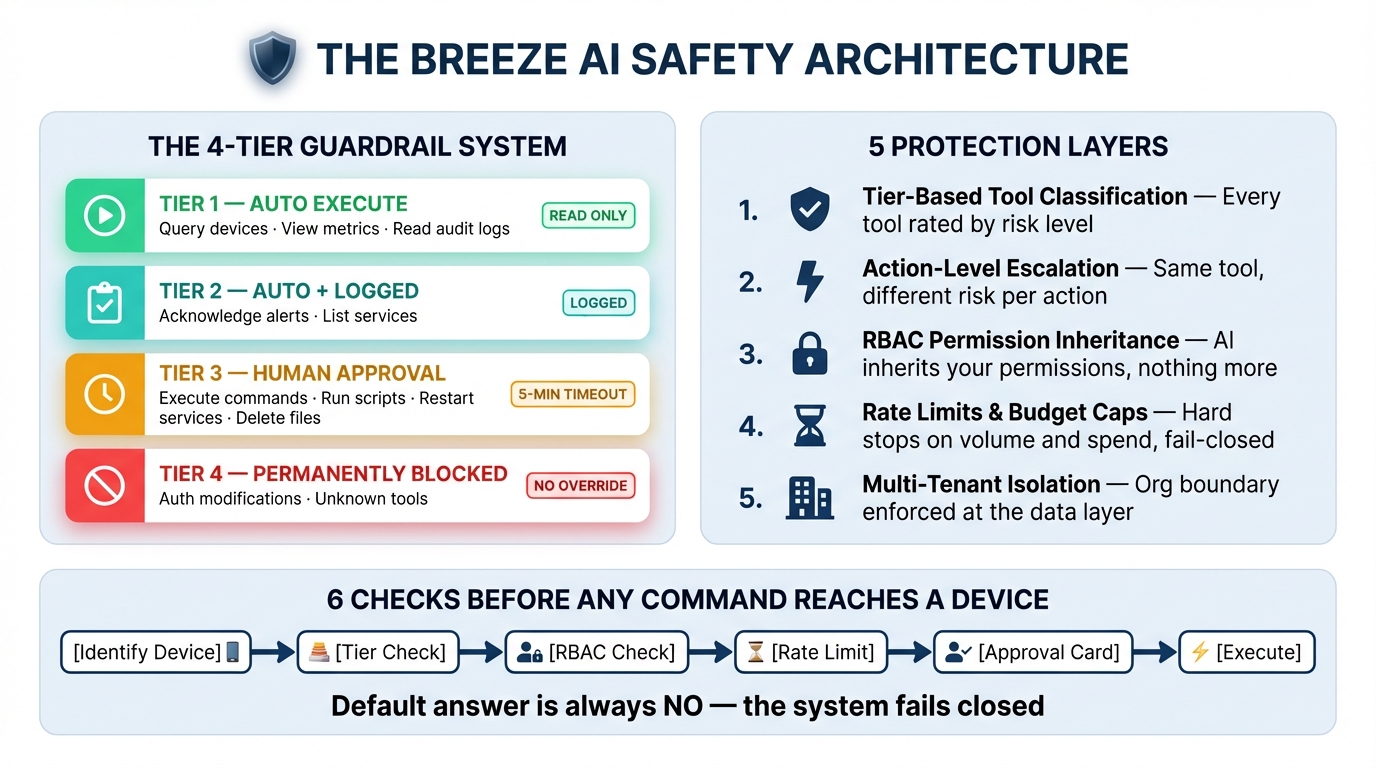
But “trust us, there’s an approval button” isn’t enough. Here are the five layers that make it structurally impossible for Breeze AI to break your clients’ environments.
Layer 1: The 4-Tier Guardrail System
Every tool the AI can use is classified into one of four tiers:
| Tier | Behavior | Examples |
|---|---|---|
| Tier 1 | Runs automatically | Query devices, view metrics, read audit logs |
| Tier 2 | Runs automatically + logged | Acknowledge alerts, list services |
| Tier 3 | Blocked until you approve | Execute commands, run scripts, restart services, delete files |
| Tier 4 | Permanently blocked | Unknown tools, auth modifications |
The AI can read anything it has access to. It cannot change anything without you.
Tier 3 approval has a 5-minute timeout. If you walk away, it auto-rejects. If the database goes down mid-approval, it auto-rejects. The default answer is always “no.”
Layer 2: Action-Level Escalation
Here’s where it gets interesting. A single tool can have both safe and dangerous actions. Breeze handles this at the action level, not just the tool level.
Take file_operations. Listing files? Tier 1 — runs instantly. Reading a file? Tier 1. But writing, deleting, renaming, or creating directories? Those escalate to Tier 3 and require your approval.
Same with manage_services. Listing services is a read — auto-execute. Restarting a service is destructive — approval required.
This means the AI can’t smuggle a dangerous operation through a safe-looking tool. The escalation logic inspects the action, not just the tool name.
Layer 3: Your Existing RBAC Permissions
The AI doesn’t have its own permissions. It inherits yours.
When you chat with Breeze AI, every tool invocation is checked against your role-based access control. If your account doesn’t have devices.execute, the AI can’t execute commands on devices — regardless of what tier the tool is. If you’re scoped to a specific site, the AI can only see devices at that site.
This is enforced server-side through the same permission system that governs the rest of the platform. The AI is just another caller bound by the same rules.
Layer 4: Rate Limits and Budget Caps
Even with approval, there are hard limits on how much the AI can do:
Per-tool rate limits — Commands are capped at 10 per 5 minutes. Scripts at 5 per 5 minutes. Network discovery scans at 2 per 10 minutes. These limits apply per-user, enforced via Redis sliding windows.
Message rate limits — 20 messages per minute per user, 200 per hour per organization.
Budget caps — Admins can set daily and monthly spending limits. When you hit the cap, AI stops responding until the next period.
Cost anomaly detection — If a single session consumes more than 10% of the daily budget, or daily spend exceeds 80% of the cap, the system flags it immediately.
And the critical design decision: all of these checks fail closed. If Redis goes down and the rate limiter can’t run, requests are denied. If the database is unreachable and budget can’t be verified, requests are denied. Infrastructure failure makes the system more restrictive, not less.
This is the opposite of how most systems work. Most systems fail open — “if we can’t check, just let it through.” Breeze assumes the worst.
Layer 5: Multi-Tenant Isolation
Every single database query the AI executes is scoped to your organization. This isn’t an afterthought — it’s baked into the query layer through an orgCondition that gets applied automatically.
The AI can’t see devices from another client. It can’t reference alerts from another org. It can’t accidentally run a script on a machine that belongs to someone else. The boundary is enforced at the data layer, not in the prompt.
Session ownership is verified too. One user can’t approve another user’s AI tool execution unless they belong to the same org with appropriate permissions.
You Don’t Have to Trust Us
Breeze is open source. Every safety mechanism described in this post lives in code you can read, audit, and modify:
- Guardrail tiers and escalation logic —
apps/api/src/services/aiGuardrails.ts - Budget enforcement and anomaly detection —
apps/api/src/services/aiCostTracker.ts - Approval flow with circuit breakers —
apps/api/src/services/aiAgent.ts - Tool implementations with org scoping —
apps/api/src/services/aiTools.ts
No black boxes. No “proprietary safety layer.” The code is the documentation, and you can verify every claim in this post by reading it.
What This Means in Practice
When you ask Breeze AI to “restart the print spooler on FRONT-DESK-PC,” here’s what actually happens:
- The AI identifies the device (Tier 1 — auto-execute, read-only)
- It calls
manage_serviceswith actionrestart(escalated to Tier 3) - Your RBAC permissions are checked — do you have
devices.execute? - The per-tool rate limit is checked — have you restarted too many services recently?
- An approval card appears in your chat with exactly what will happen
- You click Approve (or it auto-rejects in 5 minutes)
- Only then does the command reach the device
Six checks. One human decision. Zero ambiguity.
This is Part 1 of the Breeze AI Safety & Capabilities series. Next: Under the Hood: How Breeze AI’s Guardrails Actually Work