We Built a Production RMM Platform with AI -- Here's the Honest Truth
The Numbers
Let’s start with the raw stats, because they’re the part that sounds made up.
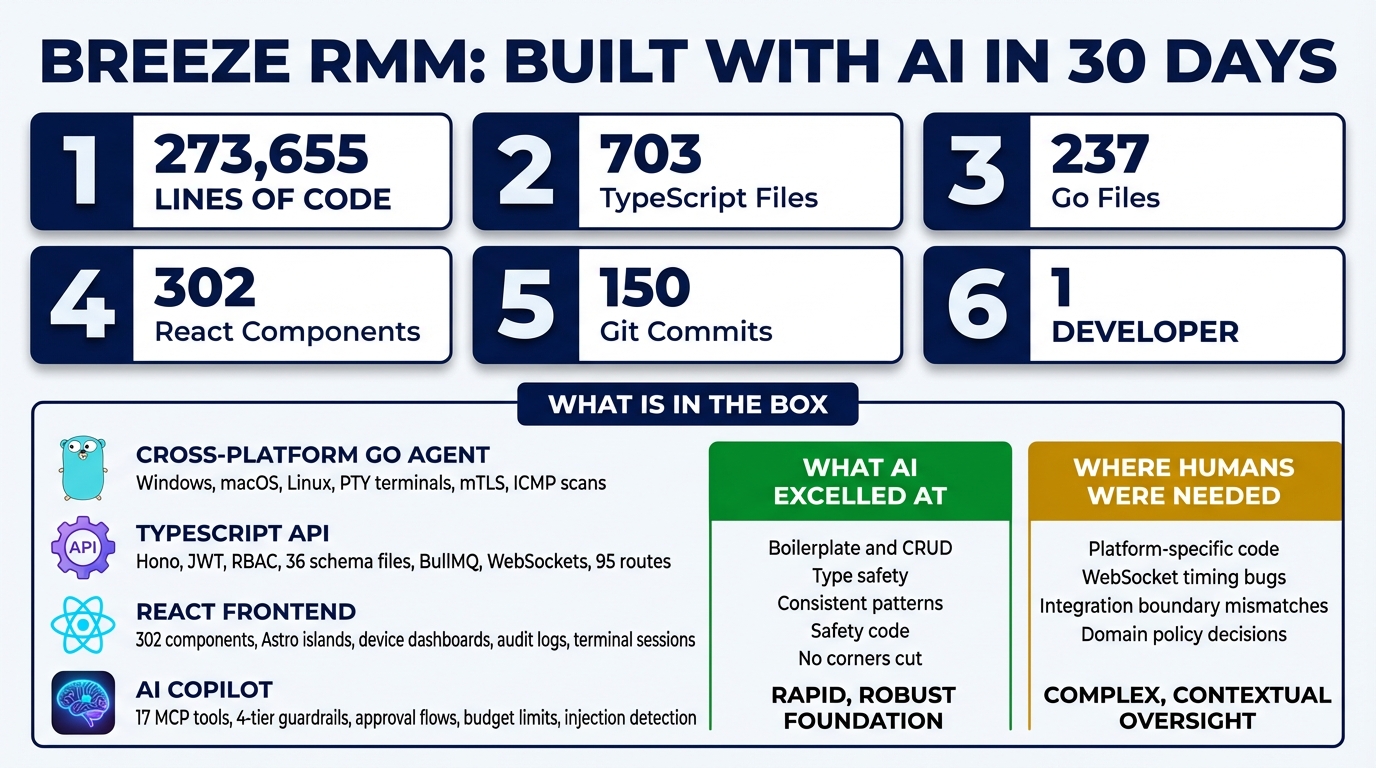
- 273,655 lines of code
- 703 TypeScript files, 237 Go files, 99 Astro pages
- 95 API route files, 36 database schema files, 71 service modules
- 302 React components, 26 Go agent packages
- 150 git commits over one month
- One developer. One AI coding assistant.
The first commit landed on January 13, 2026. Thirty days later, we had a working Remote Monitoring and Management platform with a cross-platform agent, a multi-tenant API, a React frontend, an AI copilot, mTLS device authentication, and WebSocket real-time communication.
These numbers are real. The git history is there. And the honest story behind them is more interesting than “AI wrote everything” or “AI is just autocomplete.”
What Breeze Actually Is
Breeze is an RMM platform — the kind of software that Managed Service Providers use to monitor and manage thousands of client devices. Think ConnectWise Automate, Datto RMM, or NinjaOne. It’s a category that’s existed for decades, dominated by legacy vendors shipping Electron wrappers around aging .NET backends.
This is not a demo. It’s not a weekend hackathon project dressed up with a landing page. Here’s what’s actually in the box:
A cross-platform Go agent that runs on Windows, macOS, and Linux. It handles heartbeat reporting, command execution, PTY terminal sessions, network discovery scanning, disk analysis, and mTLS certificate management. Twenty-six packages of real systems code, including platform-specific PTY implementations and ICMP ping sweeps.
A TypeScript API built on Hono with JWT authentication, role-based access control, and a multi-tenant organization hierarchy — Partner, Organization, Site, Device Group, Device. Thirty-six Drizzle ORM schema files define the data model. BullMQ and Redis handle job queues. WebSockets provide real-time agent communication.
A React frontend with 302 components built as Astro islands. Device dashboards, terminal sessions, script management, discovery results, alert configuration, audit logs.
An AI copilot with 17 MCP tools, four tiers of permission guardrails, human approval flows for destructive operations, budget enforcement with circuit breakers, and prompt injection detection.
Cloudflare mTLS for zero-trust device authentication, with certificate lifecycle management, automatic renewal, and quarantine flows for compromised devices.
This is enterprise-grade plumbing. The kind of software that normally requires a team of 10 engineers and six months of sprints.
How We Actually Built It
The primary development tool was Claude Code, Anthropic’s AI coding assistant. The workflow is straightforward to describe but takes practice to execute well.
You describe what you need. Not in pseudocode — in plain language, with architectural context. “Add a new API route for device groups that follows the same pattern as the sites routes, with org-scoped access control and Zod validation on the request body.” The AI produces the code. You review it. You iterate. You move on.
This is not “AI wrote everything while I watched.” That framing is both inaccurate and unhelpful. The human role is substantial: defining the architecture, making design decisions, providing domain knowledge about how MSPs actually work, reviewing every piece of output, catching integration issues, and debugging the problems that cross module boundaries.
Think of it less like dictation and more like working with an extremely fast, extremely consistent junior developer who has read every documentation page on earth but has never actually operated a production system.
What AI Did Well
The strength of AI-assisted development is not in the spectacular — it’s in the tedious.
Boilerplate and CRUD. Ninety-five API route files follow the same patterns: validate input with Zod, check authorization, query with Drizzle, return typed responses. After establishing the pattern in the first few routes, the AI replicated it flawlessly across every subsequent one. No drift. No “I’ll skip validation on this one because I’m tired.”
Type definitions and schemas. Zod validators on every endpoint. TypeScript interfaces in the shared package. Drizzle schema definitions. The AI is obsessive about type safety in a way that humans aspire to but rarely achieve across 700 files.
Consistent patterns. Multi-tenant access control requires an orgCondition() filter on virtually every database query. The AI applies it identically every time. It doesn’t forget on the 47th endpoint because it’s Friday afternoon. It doesn’t decide “this one probably doesn’t need it” because the route seems internal.
Test scaffolding. Setting up test files, mock configurations, and assertion structures. The repetitive setup that makes developers procrastinate on writing tests in the first place.
Documentation consistency. JSDoc comments, README sections, API documentation — all following the same voice and structure. The AI doesn’t have a “good documentation day” and a “bad documentation day.”
What AI Needed Help With
Here’s where honesty matters, because the limitations are as instructive as the strengths.
The macOS PTY bug. The agent’s terminal feature needed platform-specific PTY (pseudo-terminal) allocation. On macOS, this requires an ioctl call with the TIOCPTYGNAME constant. The AI confidently produced the wrong constant value. The fix required rewriting the implementation to use cgo with POSIX functions (posix_openpt, grantpt, unlockpt, ptsname) instead of raw ioctls. This is deep systems programming where the AI’s training data contained conflicting information, and it had no way to verify correctness without running on actual hardware.
WebSocket race conditions. The browser terminal was sending resize events before the server’s onOpen handler had finished initializing. This is a timing bug that only manifests under real network conditions. The AI understands API contracts perfectly but struggles with the implicit ordering assumptions that emerge when independently-developed components interact over asynchronous channels.
Multi-tenant domain logic. The AI could implement the access control mechanism flawlessly, but deciding which entities belong to which tenants, what “site-scoped” means versus “org-scoped,” and how partner-level users should see aggregated data across customer organizations — that required domain knowledge about how MSPs actually structure their businesses.
Discovery result routing. The agent’s network discovery feature sent scan results back via WebSocket, but the API’s command processing expected results to arrive through the BullMQ job queue. This integration mismatch between two subsystems that were developed independently is exactly the kind of bug that AI produces: each piece is internally correct, but the assumptions at the boundary don’t match.
The Result
The codebase is maintainable. It’s well-structured. It passes code review. It reads like it was written by a single, disciplined developer who follows patterns religiously and never has an off day.
It’s not perfect. There are places where the abstraction is more verbose than a senior engineer would write. There are a few modules where the AI’s tendency toward completeness produced more code than strictly necessary. There are integration boundaries where independently-generated subsystems needed manual stitching.
But here’s the thing: those same criticisms apply to every codebase written by a team of humans. The difference is consistency. In a human team, you get varying code styles, different levels of error handling rigor, and the inevitable “someone forgot to add input validation on this endpoint.” In AI-assisted code, you get the same patterns applied uniformly across the entire codebase.
What This Means
The takeaway is not “AI replaces developers.” It demonstrably does not. The architecture, the domain knowledge, the design decisions, the integration debugging — all of that was human work.
The takeaway is that AI makes small teams dangerous. One person with AI assistance can build what used to require a team of 10 and a six-month timeline. Not because AI is smarter than 10 engineers, but because it eliminates the bottleneck of translating architectural decisions into consistent implementation across hundreds of files.
The bottleneck shifts from typing to thinking. From “how do I implement this CRUD endpoint” to “what should the data model look like.” From “write the validation schema” to “what are the edge cases in multi-tenant access control.”
That shift changes who can build production software, how fast they can build it, and what a small team can realistically ship. Whether that’s exciting or terrifying probably depends on whether you’re the small team or the large one.
The code is real. The numbers are real. And the honest truth is that the future of software development is not AI replacing humans — it’s humans who know how to direct AI replacing teams that don’t.
This is Part 1 of the AI Meta-Story series. Next: AI Built Its Own Safety Cage