Shipping AI-Written Code to Production: Our Playbook
The Reality
AI-written code is already in production everywhere. Most teams just won’t say it out loud.
Every developer using Copilot, Cursor, Claude Code, or any other AI coding tool is shipping AI-generated code to production. The tab-completions, the generated functions, the “write me a test for this” outputs — they’re in your codebase right now. The question isn’t whether to ship AI-written code. It’s whether you have a methodology for doing it well.
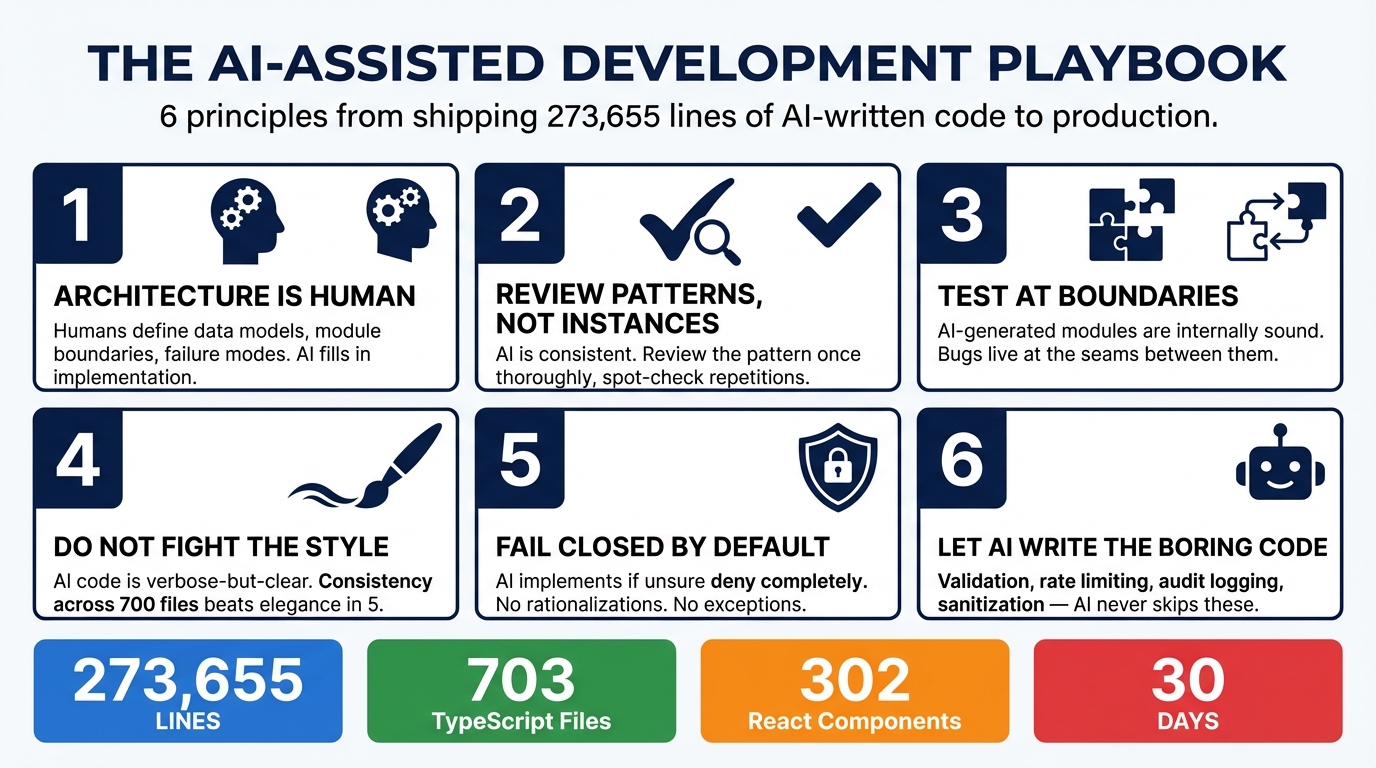
Breeze RMM ships 273,655 lines of predominantly AI-written code. A cross-platform Go agent, a multi-tenant TypeScript API, 302 React components, an AI copilot with production guardrails. Built in one month. Here’s the playbook we developed.
Principle 1: Architecture Is Human, Implementation Is AI
This is the most important principle, and it’s the one most people get backward.
The temptation is to let AI make architectural decisions because it can generate plausible-sounding rationale for any approach. Resist this. AI will confidently propose architectures that are internally coherent but wrong for your specific constraints, your team size, your operational reality, and your users.
Humans define the data model, the module boundaries, the API contracts, the tenant isolation strategy, and the failure modes. AI fills in the implementation within those boundaries.
For Breeze, this meant a human decided on the Partner-Organization-Site-Device hierarchy, chose Drizzle ORM over Prisma, selected BullMQ for job queues, and designed the four-tier AI guardrail system. AI implemented the 36 schema files, the 95 route handlers, the queue workers, and the guardrail enforcement code.
The architecture decisions took days of thought. The implementation of those decisions took hours with AI assistance. That ratio — slow, careful design followed by fast, consistent implementation — is the correct way to use AI for production code.
Principle 2: Review Everything, Trust Patterns
You cannot skip code review on AI-generated code. But you can review it efficiently.
AI produces remarkably consistent code. Once you establish a pattern — say, an org-scoped database query with Zod validation, Drizzle query, and typed response — the AI replicates that pattern identically across every subsequent instance. It doesn’t drift. It doesn’t introduce personal style variations. It doesn’t get creative with the 50th endpoint.
This means you can front-load your review effort. Thoroughly review the pattern the first time it appears. Verify the org scoping is correct, the validation is complete, the error handling is right. Once the pattern passes review, spot-check subsequent instances. They will follow the same structure.
This is the opposite of reviewing code from a human team, where every developer implements the “same” pattern slightly differently, and you have to carefully read each instance because the variations might hide bugs.
Pattern consistency is AI’s single greatest advantage for code review efficiency. Use it.
Principle 3: Test at Integration Boundaries
AI writes excellent unit-level code. Functions that take inputs and produce outputs, classes with well-defined methods, handlers that process requests and return responses — these are internally sound essentially every time.
It breaks at boundaries.
The bugs in Breeze’s development were almost exclusively integration issues: the agent sending discovery results via WebSocket while the API expected them through the job queue. The browser sending terminal resize events before the server finished initialization. The macOS PTY implementation using incorrect kernel constants.
Every one of these bugs occurred at the seam between two independently-generated components. Each component was correct in isolation. The assumptions at the interface didn’t match.
Your test effort should disproportionately focus on:
- API-to-agent communication. Does the agent actually send what the API expects to receive?
- WebSocket flows. Do the message ordering assumptions hold under real network conditions?
- Multi-step workflows. Does the chain of command dispatch, agent execution, result reporting, and UI update actually work end to end?
- Platform-specific code. Does the code that works on Linux also work on macOS and Windows?
Unit tests on AI-generated code are largely confirming what you already know. Integration tests are where you find real bugs.
Principle 4: Don’t Fight the AI’s Style
AI-generated code has a consistent style. It tends toward explicitness over cleverness. It favors verbose-but-clear over compact-but-cryptic. It writes out intermediate variables that a human might inline. It adds type annotations that TypeScript could infer.
You will be tempted to “clean it up.” To make it more elegant. To apply the refactoring instincts you’ve developed over years of writing code by hand.
Resist this, at least at scale.
Consistency across 700 files is more valuable than elegance in 5. When every file follows the same verbose-but-clear pattern, any developer (including your future self) can read any file and immediately understand the structure. When you’ve hand-optimized some files but not others, you’ve created two styles that need to be mentally context-switched between.
There are exceptions. If the AI produces genuinely bad abstractions or incorrect patterns, fix them everywhere. But “I would have written this more concisely” is not a sufficient reason to introduce inconsistency into a codebase that’s currently uniform.
Principle 5: Fail-Closed by Default
When you instruct AI to implement fail-closed behavior, it does. Consistently. Across every error path, every failure mode, every edge case.
This is one of AI’s genuine superpowers for production code. The instruction “if you can’t verify safety, deny the request” gets applied to every budget check, every rate limit, every permission verification, every tool invocation guard. No exceptions. No “well, this one is probably fine.”
Make fail-closed your default instruction for every safety-critical system. The AI will implement it completely, and you’ll end up with a system where the failure mode is always “stop and wait for a human” rather than “proceed and hope for the best.”
Human developers rationalize fail-open behavior constantly. “The rate limiter is down, but we can’t block all users.” “The auth service is slow, let’s cache the last result.” “This endpoint is internal, it doesn’t need validation.” AI doesn’t rationalize. It follows the instruction. For safety-critical code, that’s exactly what you want.
Principle 6: Let AI Write the Boring Safety Code
Validation. Sanitization. Rate limiting. Audit logging. Error handling. Input parsing. Output encoding. Tenant scoping.
This is the code that makes the difference between a system that survives contact with real users and one that doesn’t. It’s also the code that human developers consistently under-invest in because it’s tedious, repetitive, and unexciting. Nobody gets promoted for writing comprehensive Zod schemas.
AI writes this code perfectly every time because it doesn’t experience tedium. It doesn’t decide “this internal endpoint probably doesn’t need rate limiting.” It doesn’t skip audit logging on the command that “will never be called in production.” It implements the full pattern on every endpoint, every handler, every tool invocation.
The result is a codebase where the security hygiene — the boring, critical plumbing that prevents real-world incidents — is more thorough and more consistent than what most human teams produce. Not because AI is better at security thinking, but because it’s immune to the boredom that causes humans to cut corners on safety code.
What We’d Do Differently
A month of intensive AI-assisted development taught us things we’d apply from day one next time.
More integration tests from day one. We knew AI-generated code would be correct at the unit level. We should have invested earlier in end-to-end tests that exercise the full flow: API request to agent command to result processing to UI update. The bugs that mattered were all at these integration boundaries.
Better architectural documentation upfront. AI works dramatically better with clear module boundaries and explicit interface contracts. The time spent writing a one-page document describing how the agent and API communicate via WebSocket would have prevented the discovery result routing bug entirely. AI is excellent at following specifications; it’s poor at inferring unstated assumptions.
Earlier load testing. AI-generated code is functionally correct but not inherently performant. Patterns that work fine for 10 devices may not scale to 10,000. We should have established load testing infrastructure earlier to catch performance issues before they were baked into patterns replicated across the codebase.
Even more explicit failure mode specifications. “Fail closed” is a good default instruction, but specifying the exact behavior for every failure scenario upfront — “if Redis is down, return 503, not 500” or “if the cert authority is unreachable, quarantine the device, don’t disconnect it” — produces better results than letting the AI choose reasonable defaults.
The playbook is not complicated. Architecture is human. Implementation is AI. Review patterns, not instances. Test at boundaries. Don’t fight the style. Fail closed. Let AI write the boring safety code.
The hard part is not the methodology. The hard part is accepting that the way you’ve always written code — one function at a time, manually, over months — is no longer the only option. And that the new option, used with discipline, produces code that ships faster and fails less often than the old one.
This is Part 4 of the AI Meta-Story series. Previous: What AI Gets Right (and Wrong) About Security Engineering