The Foundation Controls: Asset, Software, Data, and Configuration
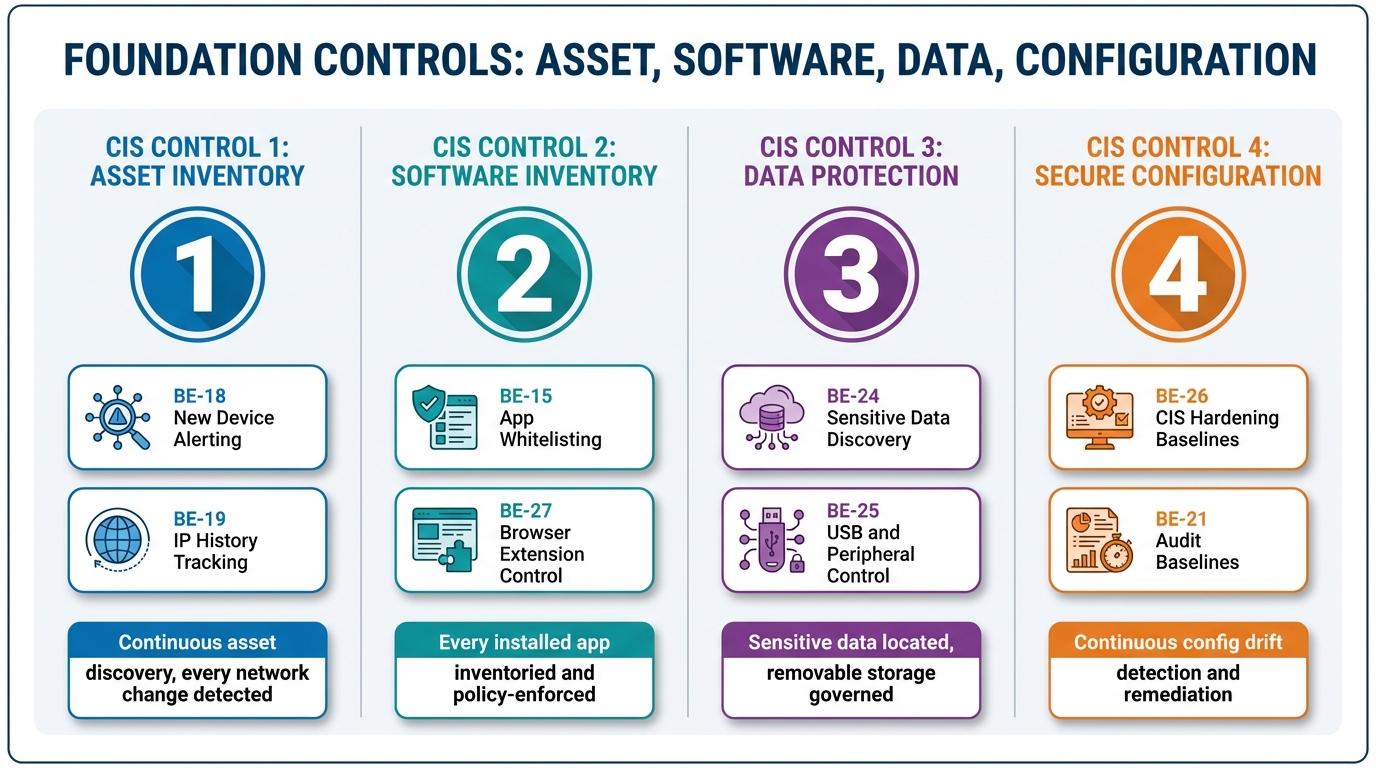
There is a version of this conversation that most MSPs have had at least once: a client fails a CIS assessment on Controls 1 through 4, and the MSP is genuinely surprised. They have discovery tooling. They have a software inventory. They have a configuration baseline. They have encryption enforced. The assessor is not disputing any of that.
The problem is that none of it was continuous.
CIS Controls 1, 2, 3, and 4 are where the foundational architecture of every other control is built. Asset inventory, software inventory, data protection, secure configuration — these four controls define the operating surface you are trying to protect. Every subsequent control assumes these are solved: that you know what devices exist, what runs on them, what data they hold, and that they are hardened. When Controls 1 through 4 are partially implemented — visible but not enforced — every control that depends on them is weaker than it appears.
The gap that most platforms leave in this range is the same one they leave everywhere: they show you the state of the environment, but they do not continuously enforce it. Visibility is not coverage. What follows is what coverage actually looks like, control by control.
CIS Control 1: Asset Inventory
The language in CIS v8 is unambiguous. Control 1 requires that you “actively manage,” “track,” and “correct” the inventory of enterprise assets. The word “actively” carries weight. An asset inventory that is populated at enrollment and updated only when a technician manually runs a scan is not active. It is a historical document.
There are two problems that a passive inventory creates. The first is operational: you do not know about devices you do not know about. A rogue device — a personal laptop plugged into a client’s wired switch, a Raspberry Pi running SSH on a quiet port, a consumer router someone connected to the guest network — does not appear in the inventory until someone looks. And in a fleet of 200 devices across eight client sites, “someone looks” is not a reliable detection mechanism.
The second problem is forensic. When something goes wrong — when a firewall log shows suspicious traffic from an internal IP at 2:30 AM — you need to answer a question that a static inventory cannot: which device had that IP address at that specific moment? Dynamic DHCP environments hand out addresses and recycle them. A device that triggered an alert last Tuesday at 2:30 AM may have a different IP today, and the device that currently holds that IP may have had nothing to do with the incident.
BE-18, New Device Alerting, runs continuous network scanning on a configurable schedule — defaulting to every four hours per subnet — and compares results against a known baseline. When a new device appears, it fires an alert. When a device disappears, it fires an alert. When a device changes — different IP, different MAC, different open ports — it fires an alert. The platform distinguishes between a new printer from a known manufacturer showing expected ports and a Raspberry Pi with SSH open on a non-standard port. The former gets logged as an expected addition. The latter gets flagged as suspicious and requires explicit acknowledgment.
BE-19, IP History, provides the forensic layer. Every device maintains a timeline of the IP addresses it has held, with timestamps. Given an IP and a time range, the platform produces the device that held that address at that moment. That query — which took hours of log correlation in a fragmented stack — returns in seconds. When the firewall analyst asks “what was at 10.0.1.47 at 2:30 AM on Tuesday?”, the answer is not a research project.
BE-5 closes the loop between discovery and monitoring. When a new device is found during a scan, the platform proposes monitoring configuration based on what ports are open and what services are visible. A web server gets HTTP monitors. A database server gets TCP port monitoring. A printer gets ICMP ping and SNMP polling. Baseline behavior is established automatically over 48 hours, and alert thresholds are calibrated against observed patterns rather than set to static defaults. Device discovery does not just populate a list — it initiates the monitoring lifecycle.
CIS Control 2: Software Inventory
Software inventory is where most RMMs produce data that requires human judgment to act on. The inventory exists: every device, every installed application, version numbers, install dates. The gap is between having that inventory and doing something consistent with it.
The question CIS Control 2 actually asks is not “do you know what software is installed?” It is “do you have a policy defining what software is authorized, and do you enforce it continuously?” Those are different questions. The first is answered by a report. The second is answered by a running enforcement process.
BE-15, Application Whitelisting, is the enforcement layer. Policies define allowlists, blocklists, and audit-mode rules. Rules match on software name, publisher, and install location — which matters because the same executable in a user’s Downloads folder and in Program Files represents different risk profiles. Enforcement runs every 15 minutes alongside the software inventory cycle. Three action modes are available: alert-only for applications that need visibility without disruption, prevent-launch for blocklisted applications that should never run, and auto-uninstall for policy violations that require remediation.
The platform surfaces violations with enough context to make them actionable. AnyDesk installed on a managed device without authorization is not just a policy violation — it is an unauthorized remote access tool on a machine that may already have RMM-managed remote access, which raises the question of why a second remote access tool is present. uTorrent is a P2P application with well-documented use in malware distribution chains and legal liability exposure for clients in regulated industries. Wireshark on a user endpoint may be a legitimate network troubleshooting tool used by a technically sophisticated user, or it may indicate someone running packet captures they should not be running. The platform surfaces all three. The policy determines the response. The enforcement happens automatically.
BE-27 extends software inventory to browser extensions — a category that most application whitelisting approaches ignore entirely, and one that represents substantial risk exposure. Extensions for Chrome, Edge, Firefox, Safari, and Brave are inventoried including the permissions each extension has been granted, whether it was installed from an official web store or sideloaded, and its current enabled status. Extensions requesting the all_urls, webRequest, and cookies permissions in combination have read access to every site the user visits and can intercept or modify any network request the browser makes. Sideloaded extensions — installed outside the official web store — are always flagged regardless of permissions, because they bypass the review process entirely. Enforcement runs via enterprise browser management policies where available.
CIS Control 3: Data Protection
CIS Control 3 covers data protection broadly — encryption at rest, monitoring for sensitive data, controlling data exfiltration paths. The enforcement gap here is more fundamental than in Controls 1 and 2, because most MSPs do not have active data protection capabilities at all. Encryption status is tracked. Sensitive data discovery and USB control are treated as enterprise-only features in most RMM platforms, available at per-device pricing that makes them impractical for SMB clients.
BE-24, Sensitive Data Discovery, scans devices for patterns that indicate presence of regulated or high-risk data. The scan covers PII patterns — Social Security numbers, email addresses, phone numbers — PCI data including credit card numbers with Luhn validation, PHI categories including medical record numbers and ICD codes, credential patterns including private keys, dotenv files, AWS credentials, GitHub tokens, and Stripe keys, and financial data patterns. User profiles, Downloads directories, Documents folders, and connected shared drives are scanned by default.
The platform returns file paths, match types, and match counts. It does not return the actual data values. A report showing that a user’s Downloads folder contains a file with 47 credit card number patterns is enough information to take action. Returning the actual card numbers would make the scan output itself a regulatory liability. The privacy design is intentional — the goal is finding where sensitive data lives, not reproducing it.
BE-25, USB and Peripheral Control, monitors device connections via OS-native event mechanisms — WMI on Windows, IOKit on macOS, udev on Linux — and enforces policy at the point of connection. Three policy modes are available. Block prevents the device from mounting at all. Read-only mounts removable storage as a read-only volume, allowing users to access content on the device while preventing any data from being written to it — which stops exfiltration while maintaining legitimate use cases like reading documents from a USB drive. Alert-only logs the connection with vendor, product, serial number, device class, and timestamp without taking enforcement action, which is the appropriate setting for environments where USB blocking would create operational friction. Every connection event is logged regardless of the enforcement action applied, producing an audit trail for Control 3 compliance.
BE-9 includes encryption status as a component of the device security posture score. BitLocker status is read via manage-bde on Windows. FileVault status is read via fdesetup on macOS. LUKS volume status is read via cryptsetup on Linux. Encryption is not treated as a separate compliance check — it is part of the continuous device posture that informs alerting and scoring across the platform.
CIS Control 4: Secure Configuration
Secure configuration is the control where the distance between “we have a baseline” and “our devices are hardened” is the most costly. Initial hardening is a one-time operation. Maintaining a hardened configuration against the steady pressure of software updates, user activity, and GPO drift is a continuous process. Most platforms support the first. Very few support the second.
BE-26, CIS Benchmark Assessment, implements the full CIS Benchmark check suite for Windows, macOS, and Linux. The Windows profile covers more than 200 checks: account policies including password complexity and lockout thresholds, local policies including audit and user rights assignments, services that should be disabled, registry hardening including SMBv1 disabled and NTLMv2 enforced, Windows Firewall profile configuration across domain, private, and public profiles, BitLocker enforcement status, Defender configuration and exclusion audit, and network protocol settings including LLMNR, NetBIOS, and WPAD. The macOS profile covers more than 100 checks including FileVault, Gatekeeper, System Integrity Protection, remote login and remote management settings, and firewall stealth mode. The Linux profile covers more than 150 checks including filesystem partition configuration, SSH hardening including PermitRootLogin, PAM configuration, SUID and SGID binary audit, and network stack parameters including IP forwarding and SYN cookies.
Results are returned as pass or fail per individual check, an overall compliance percentage, and remediation commands for each failing check. The platform identifies patterns across devices. If SMBv1 is enabled on 25 of 25 devices in scope and LLMNR is not disabled on 18 of 25, those are systemic configuration failures that point to a baseline deployment gap, not individual device drift.
The remediation workflow is the piece that separates coverage from visibility. When the platform identifies that SMBv1 is enabled across a device set and LLMNR is not disabled, it can execute the remediation directly via registry changes — no reboot required, low operational risk — after presenting the proposed action and receiving approval. The technician is not triaging an alert list and scheduling individual remediation tasks. They are reviewing a proposed remediation, approving it, and watching the platform apply it across the affected device set. The evidence trail — detection timestamp, approval record, remediation action, post-remediation verification — is produced automatically and persists for the audit window.
BE-21, Audit Policy Baselines, applies the same enforcement model to audit policy configuration specifically. Windows Advanced Audit Policy settings via auditpol, macOS OpenBSM configuration, and Linux auditd rules are assessed against CIS Level 1 and Level 2 profiles. Deviations are detected continuously and can be remediated via the same approval-gated automation as BE-26. Audit policy drift is a common finding in CIS assessments — particularly for Windows environments where Group Policy inheritance can produce unexpected effective settings — and it is exactly the category of misconfiguration that does not generate alerts on its own. A device with a misconfigured audit policy is still operating normally. The only way to know the policy is wrong is to check it continuously.
The Enforcement Layer Is the Control
The common thread across Controls 1 through 4 is that each of them requires ongoing enforcement, not one-time configuration. An asset inventory populated at enrollment is not CIS Control 1. A software baseline deployed at setup is not CIS Control 2. Encryption enabled on initial provisioning is not CIS Control 3. Hardening applied during onboarding is not CIS Control 4.
Meeting these controls, in the sense that a CIS assessor will accept as meeting them, means demonstrating continuous detection and enforcement over the audit window. Every new device detected and classified. Every unauthorized software installation caught and acted on. Every sensitive data exposure found and documented. Every configuration deviation identified, remediated, and logged with timestamps.
That is not a process a technician executes. It is a process a platform enforces. The technician’s role in a properly designed system is reviewing proposed actions and approving remediations — not triaging alert queues and doing research before they can begin to respond.
The MSPs who pass CIS assessments consistently are not necessarily the ones with the most complete tool stack. They are the ones whose tooling enforces policy without depending on a technician to catch every signal. If your Control 1 through 4 implementation is primarily visibility, the assessment evidence question — show me continuous detection and remediation over 90 days — will find the gap. The gap is not the data. The data is usually there. It is the enforcement layer between the data and the documented outcome.
Next in Track 2: Controls 5 and 6 — Account and Access Control Management. What continuous enforcement means when the asset in question is a credential.
For the architecture behind these features: Build the RMM First. Then Build the Brain. — the Track 3 case for why unified data models are an architectural decision, not a feature addition.